Sending the Bulk Mail
Marketing Managers can send bulk mails manually, on a schedule, or via workflow control. If individual emails fail to send, the sending process for those emails can be retried. The functions described below are available for sending.
For bulk mails to be sent, a mail bridge must be set up. More information can be found on the Platform-Help.
Sending the Bulk Mail Manually
The sending of the bulk mail can be triggered manually, so that the bulk mail can be sent directly after creation and review. The "Send" button is active when the delivery type "Manual" is selected in the preview of the bulk mail. After the mailing process is completed, the person in charge of the bulk mail and the person who triggers the send each receive a notification informing them how many e-mails were successfully sent and how many failed.
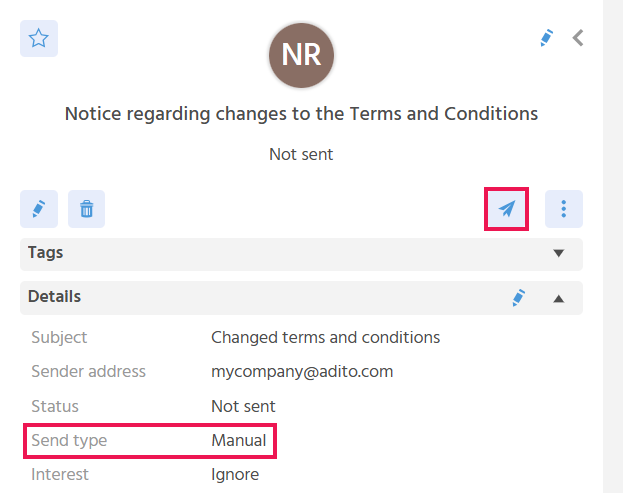
For the delivery type "Manual", the following status values exist:
- Not sent: Set initially when creating a new entry.
- Is being sent: Set as soon as the send process has started. The e-mails are sent asynchronously, meaning they are distributed into multiple queues and are processed with a time offset independently of each other. This prevents servers from being overloaded and the send process from becoming extremely slow or aborting.
- Sent: Set after the send process is completed, i.e., when all queues have been processed.
- Failed: Set when the send process aborts or is possibly incomplete.
Sending the Bulk Mail on a Schedule
Bulk mails can be sent on a schedule, so that the bulk mail sending process takes place exactly at the planned time. As soon as the send type "Planned" is selected, the send date field is displayed, in which the desired send time (day and time) can be captured. The button for manual sending is inactive for this delivery type. After the sending process is completed, the person in charge of the bulk mail and the person who triggers the sending process each receive a notification informing them how many e-mails were successfully sent and how many failed. If the sending process could not be executed at the planned time, the status "Missed" is set on the bulk mail.
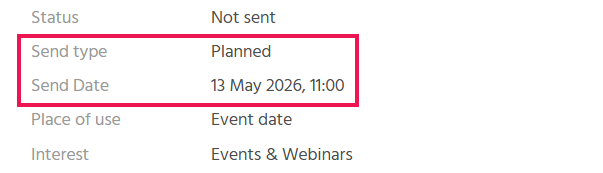
A newsletter is always to be sent on the same day of the week at the same time. To avoid missing the trigger for sending, scheduled sending is used.
For the delivery type "Planned", the following status values exist:
- Not sent: Set initially when creating a new entry.
- Being sent: Set as soon as the sending process has started.
- Sent: Set after the sending process is completed.
- Failed: Set when the sending process aborts or is possibly incomplete. The sending process for this bulk mail is not restarted at the next run of the server process.
- Missed: Set when the server process was not running and the planned send was not started. The sending process for this bulk mail is not restarted at the next run of the server process.
For scheduled sending to work, the required server process (sendPlannedBulkmails) must be activated.
Sending the Bulk Mail on an Ad Hoc Basis
With the delivery type "Ad Hoc", bulk mails can be sent in a controlled manner, so that, for example, in combination with events, e-mails are automatically sent depending on the status of an event participant.
📖 → Further information on the use of bulk mails in events can be found here.
For the delivery type "Ad Hoc", the following status values exist:
- Active: when the bulk mail should be sent automatically.
- Inactive: when the bulk mail should not yet/no longer be sent automatically.
Resending the Bulk Mail
With the Serial Action "Send again", the bulk mail can be sent again to selected recipients, so that problems with the sending process can be addressed.
- A recipient calls and asks if the e-mail can be sent again because they accidentally deleted it or did not receive it.
- A soft bounce is returned for a recipient that can be resolved.
- The sending process failed for a recipient due to an incorrectly stored e-mail address, and the e-mail address has been corrected.
The Action is only active when
- the bulk mail has the status "Failed" or "Sent" for delivery types "Manual" or "Planned".
- the bulk mail has the status "Active" for the delivery type "Ad Hoc".
- at least one recipient is selected.
Sending the Bulk Mail to New Recipients
After sending the bulk mail, additional recipients can be added and the bulk mail sending process triggered only for these recipients, so that the e-mail can be sent afterwards to recipients who were forgotten or who were only subsequently determined as a recipient group. For this, the Serial Action "Send to New Recipients" is available in the "Recipients" tab. The system identifies the subsequently added recipients and sends the bulk mail only to these.
The Action is active for the delivery type "Manual" when the bulk mail has the status "Sent".