Release Notes 2026.4.0

Please find below selected features and important information about the new xRM version.
Contact Management
🚀 Contact Synchronization via the Microsoft Graph API
As part of the phased retirement of Microsoft Exchange Web Services (EWS), contact synchronization will be provided via the Microsoft Graph API in the future. This ensures that ADITO contacts are reliably synchronized from ADITO to Exchange.
- For users, the basic functionality in the client remains unchanged (compared to the connection via EWS); the transition occurs seamlessly in the background.
- In the event of throttling via the Microsoft Graph API, a multi-step process ensures that the interface is protected from unnecessary queries.
- Should any issues or throttling occur during contact synchronization, the administrator will be notified via the new “Contact Sync Log” dashlet.
ℹ️Further informationen: PDF EN
🚀 Reliable Display of Images in Sent Emails
Images in emails are now displayed correctly externally as well. Previously, for emails created directly in ADITO, as well as for bulk and service emails sent from the HTML editor, images were stored only as binary files in the ADITO database and could not be accessed externally. Now, inserted images are automatically embedded as inline images.
- This ensures that images are displayed correctly in sent or downloaded emails.
- Images from previous messages are also reliably displayed in reply emails.
Sales
🚀 Standardized Interface for Sales Data
Do you handle your invoicing processes in an ERP system but still want to view your sales data in xRM?
No problem—we now include web services as standard, allowing you to easily transfer your sales data from third-party systems into xRM. This means that after import, the sales data is immediately available for analysis in the sales forecast and for key metrics (such as a company’s current or prior-year sales).
Technical changes:
Three new entity web services
- Order_webservice for managing documents
- Organisation_get_id_by_name_webservice for determining the organization ID based on the name
- Product_get_id_by_name_webservice for determining the product ID based on the name
New Configuration Preference: Receipt.editViaWebserviceOnly controls whether receipts can be managed exclusively via the web service or continue to be managed via the client.
ℹ️Further informationen: PDF EN
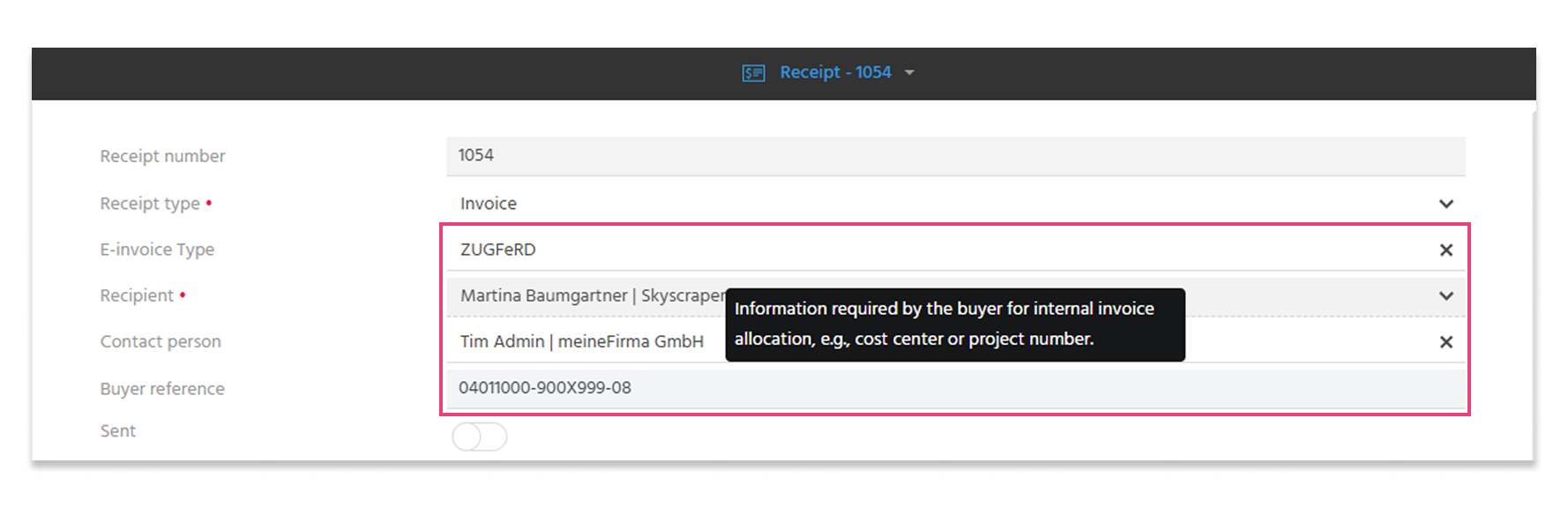
🚀 ZUGFeRD: Buyer Reference Field for Automatic Assignment by the Recipient
When creating a ZUGFeRD invoice, the user can enter an additional unique identifier specified by the invoice recipient in the Buyer Reference field, which is used for the internal automatic assignment and processing of the invoice. This could be, for example, a cost center or a project number.
ℹ️Further informationen: PDF EN
🚀 Be better prepared for every meeting—thanks to centralized contact information
In complex opportunities, it’s crucial to have the right information about the people involved readily available. Roles may change depending on the project, but important personal details must not be lost in the process.
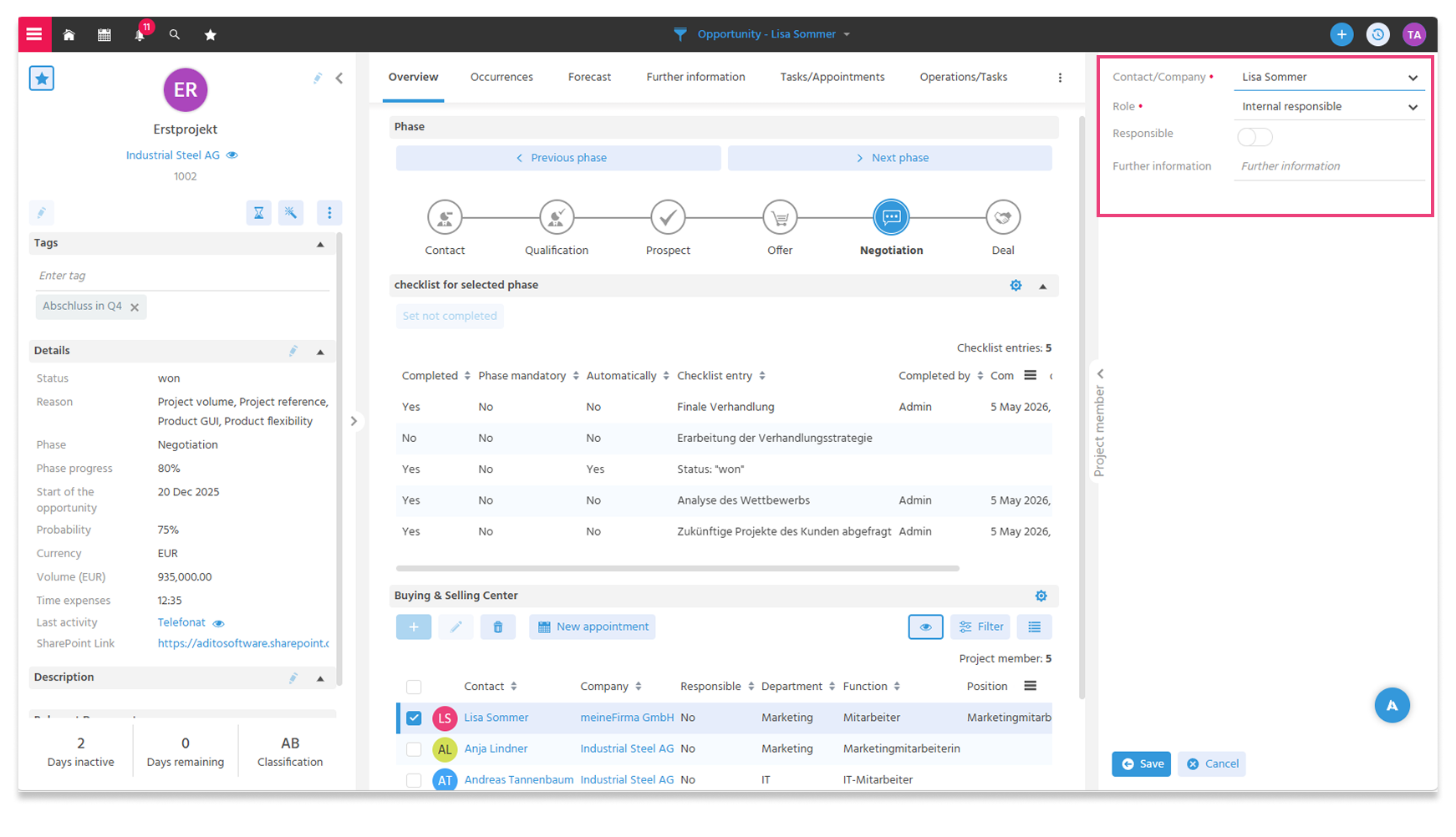
Users can now enter additional information about each person in the buying and selling center of an opportunity in a text field. This allows sales strategy notes to be documented directly within the opportunity, e.g.:
- Preferred key selling points
- Specific decision-making requirements
- Relevant personal or organizational background
The text field provides space for notes or more detailed comments and ensures that all stakeholders have access to the same information at all times.
This provides greater transparency, enabling better person-specific meeting preparation and increasing the likelihood of closing the deal.
ℹ️Further informationen: PDF EN
🚀 Clarity on Account Managers – Simple and Clear Filters
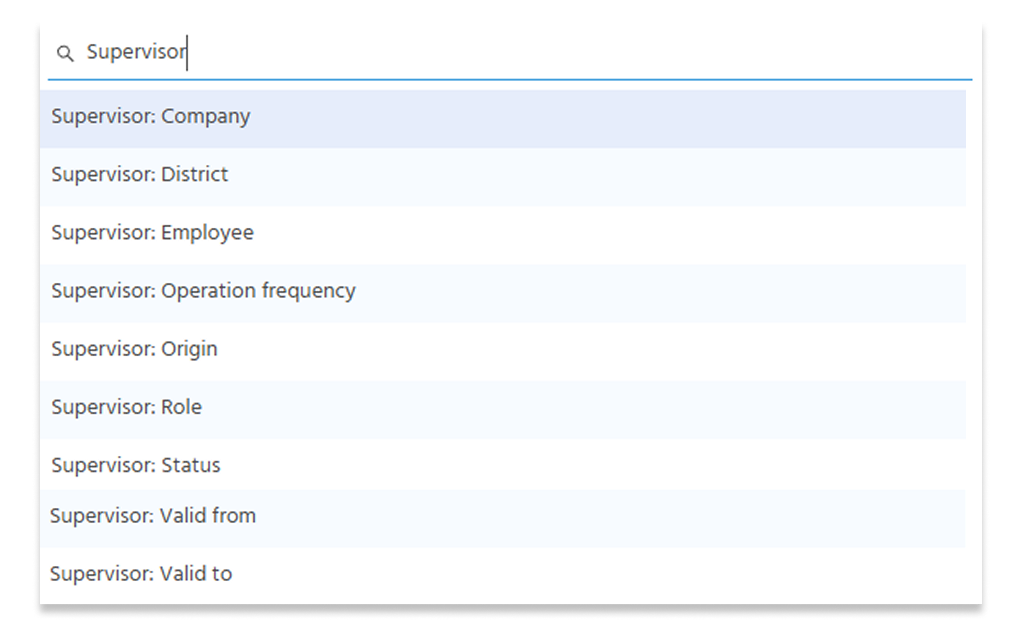
To provide greater clarity on which filters to select for what purpose regarding account managers in Company, Contact, and Opportunity, these filters have been simplified and streamlined:
- Users now have access only to the central filter set “Account Manager: …”, which includes the following filters:
- The “My Assigned Companies” dashlet has been renamed to “My Companies,” and the “Assignor: Status” filter has been set to “Active.” As a result, the dashlet now displays only those companies for which the user is listed as an active assignor. This ensures greater transparency and more relevant results.
- The “Assignor” and “Assignor Assignment” filters have been removed.
ℹ️Further informationen: PDF EN
Service
🚀 Multiple service tickets per requester are now possible
Previously, the standard logic of the Service Mailbridge prevented a sender from creating multiple service tickets at the same time. As soon as a ticket already existed for a sender, all subsequent emails from that sender were automatically assigned to that existing ticket.
In practice, this restriction led to several problems:
- Different issues raised by a single sender were mixed together in a single ticket.
- It was not possible to process different topics in parallel.
- Service staff could not recognize that multiple requests were pending.
- In customer projects, the standard code had to be modified to bypass this logic.
- Senders did not receive a confirmation email when they sent a new request without a ticket number.
The new version includes improvements to the Service Mailbridge logic:
- When senders send an email to a service mailbox and that email cannot be assigned to an existing ticket, a new service ticket is automatically created. Assignment continues to work as before, using the ticket number in the email subject line.
- In addition, an enhanced detection logic ensures that potential email loops—such as those caused by automatic system emails—are reliably prevented. Header fields such as Auto-Submitted, Precedence, X-ADITO-TicketID, or IN-Reply-To are checked and automatically filtered.
ℹ️Further informationen: PDF EN und PDF EN
🚀 Transparent Notification in Case of Undeliverable Email
If an email is sent to the requester when a service ticket is created and it bounces back as undeliverable, the ticket is automatically reopened. In this case, the assigned service representative receives a notification that the email delivery failed. This allows for a prompt response and ensures a customer-focused resolution:
- Resending the email
- Contacting the customer by phone
- Correcting the stored contact information ℹ️Further informationen: PDF EN und PDF EN
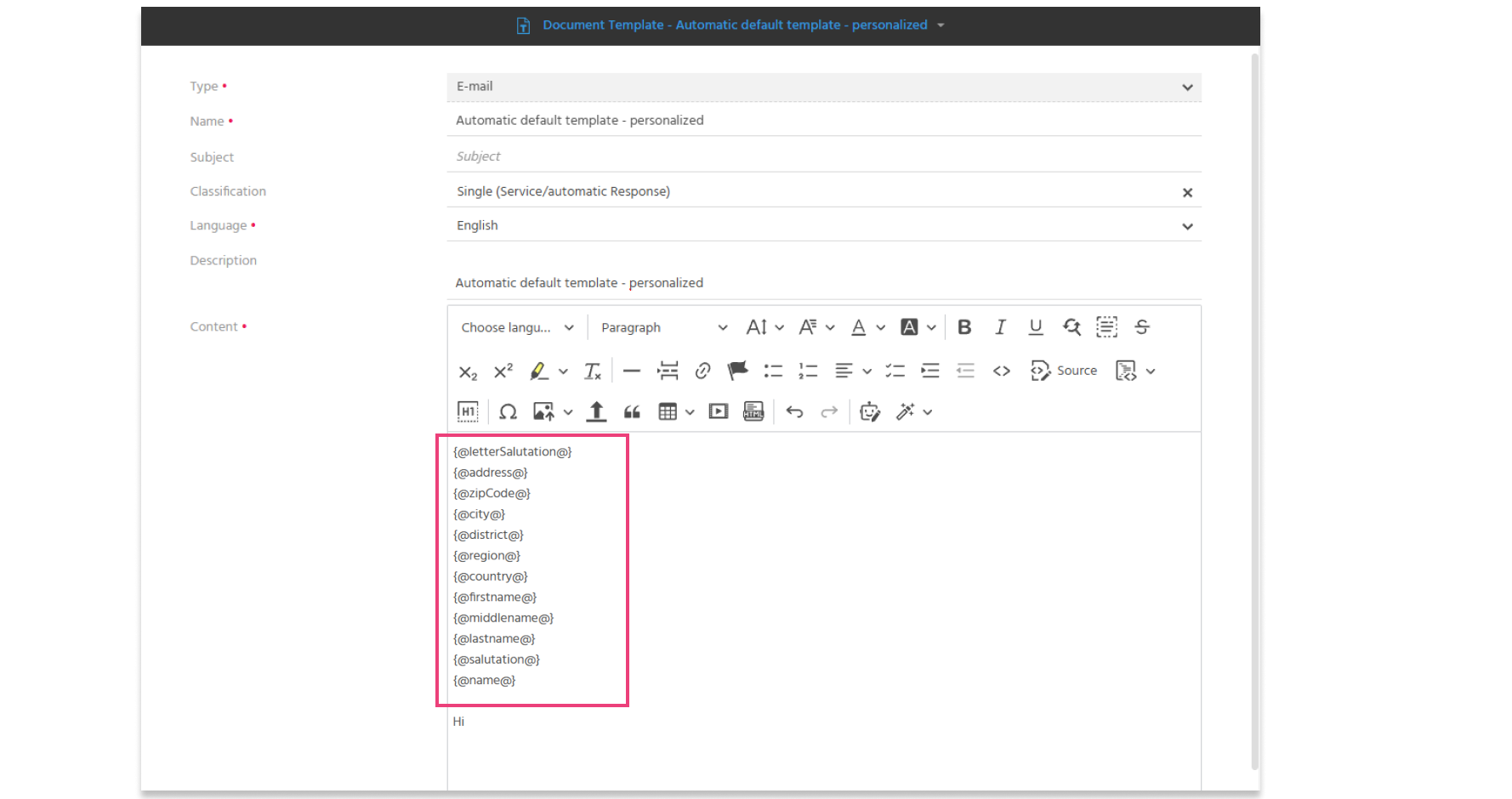
🚀 Personalized, automated reply emails
Previously, requesters could not be addressed personally in general reply emails. By using placeholders, it is now possible to address them personally. If a contact is not recorded in the system, a general reply will still be used.
With these improvements, the new version provides greater clarity in the ticketing process, increased transparency for service staff, and a significantly enhanced customer experience.
ℹ️Further informationen: PDF EN
AI
🚀 Incoming email? AI finds the right ticket template
When an email arrives, an AI feature now determines which service ticket template is the most appropriate. Previously, service ticket templates were selected based on predefined search terms when an email was received. Maintaining this logic within the inbox filter groups was very time-consuming and only allowed for a simple mapping between search terms and templates. If multiple search terms matched, the first match was used, which often led to the selection of the wrong template. Service ticket templates have been enhanced with the following features:
- Exclude from AI: A toggle button controls whether the respective template should be considered by the AI.
- AI description: The AI description field explains when and for what purpose the template is suitable.
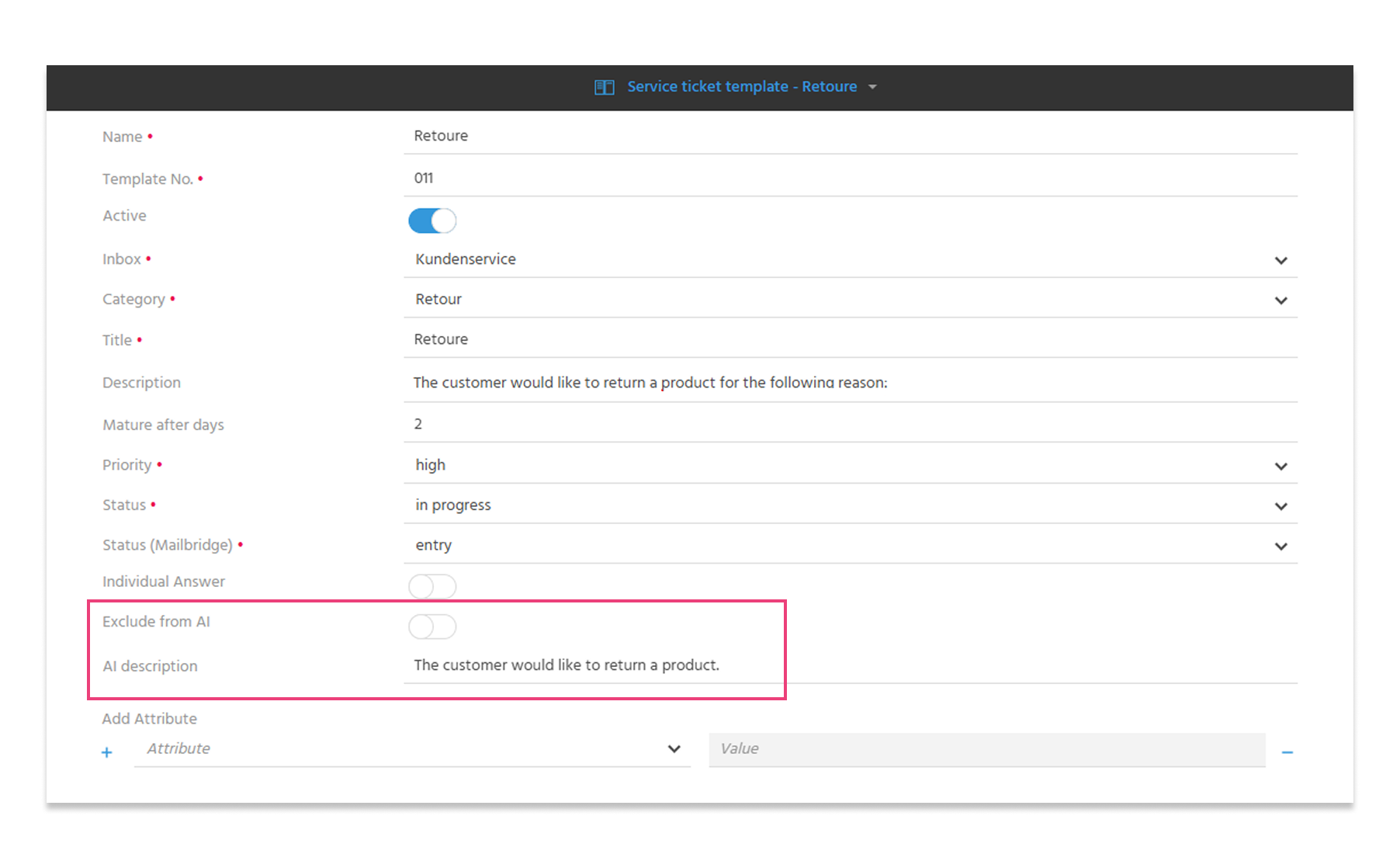
When an email is received, the new AI feature automatically analyzes the subject line, the message body, and even the contents of attachments such as PDF, TXT, ODT, and DOCX files. It then compares this information with the titles and AI descriptions of the activated service ticket templates to determine the most appropriate template. Based on this, the service ticket is created automatically. The created ticket can be manually reviewed and edited as usual. As part of this process, the inbox filter groups were intentionally set to End of Life (EOL). This also eliminates the “Properties Filter” feature almost entirely. Almost, because properties can still be stored within service ticket templates.
ℹ️Further informationen: PDF EN
🚀 AI supports the structured qualification of opportunities
Opportunities often contain a wide range of information, such as activities, descriptions, buying center data, forecasts, and much more. With AI-powered opportunity evaluation based on BANT criteria (Budget, Authority, Need, Timing), sales users are supported in qualifying opportunities in a structured manner and developing them in a targeted way.
From an opportunity, an AI-based BANT evaluation can be generated using the “Qualify by BANT (AI)” action and saved as an activity.
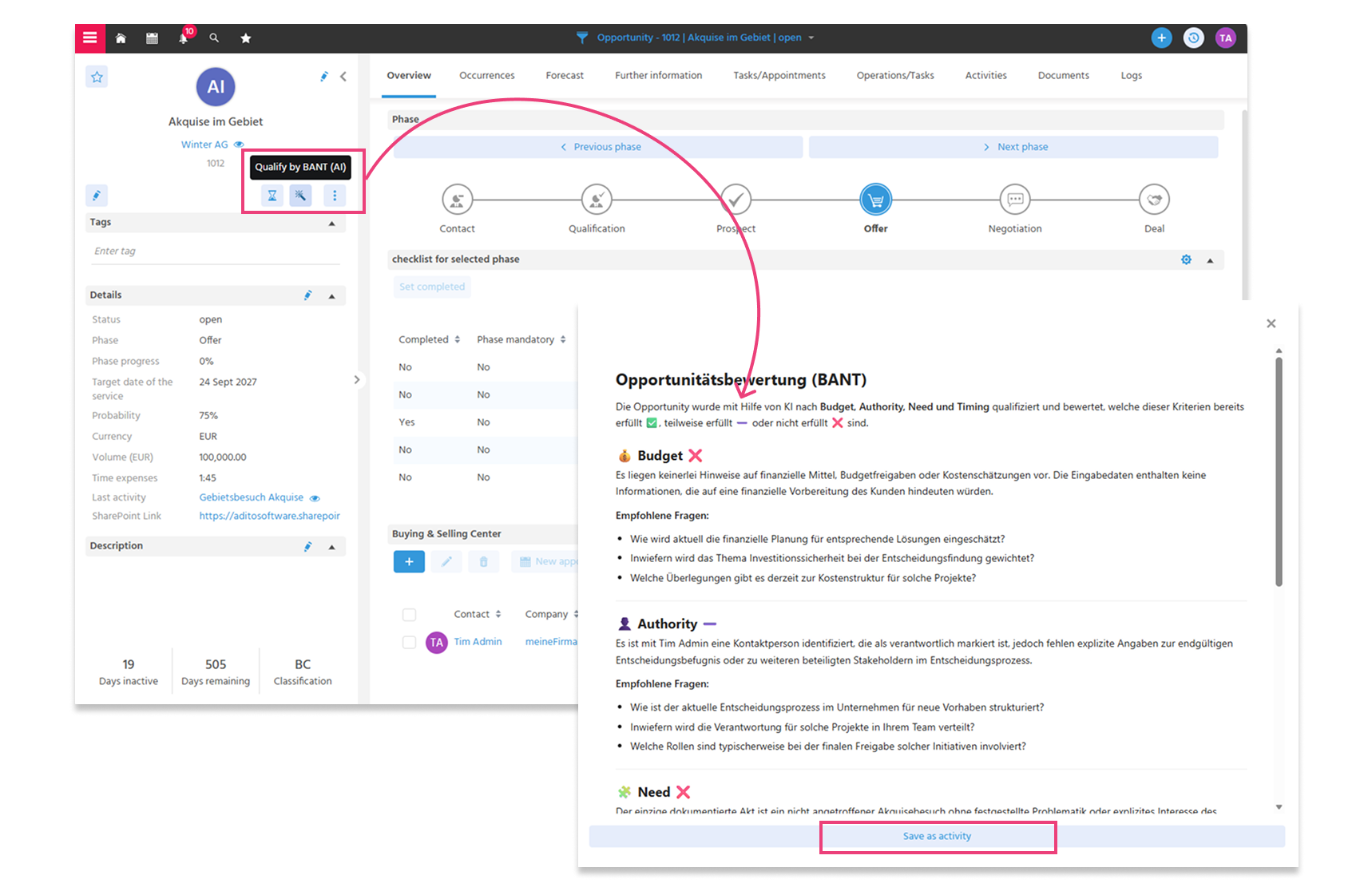
The AI evaluates each BANT criterion based on the data available in the opportunity, including activities, the opportunity description, buying and selling centers, the “Product Group” field in the stored forecasts, and the start and end dates.
For each BANT criterion, the AI provides:
- A specific assessment of the degree of fulfillment
- A reference to the underlying information (e.g., activities or description texts)
- Specific recommendations for action
Example: Authority. The AI compares documented touchpoints from activities with the information stored in the buying and selling centers. If key roles are missing or responsibilities are unclear, the user receives specific guidance on how to supplement or adjust the information, as well as suggestions for questions to ask in the next conversation.
Added Value in Sales:
- Faster assessment of opportunity maturity
- Clear guidance on next steps
- Structured qualification using the proven BANT method
- Reduced analysis effort
- More accurate forecasts
ℹ️Further informationen: PDF EN
🚀 Summarize ticket entries in a flash with AI
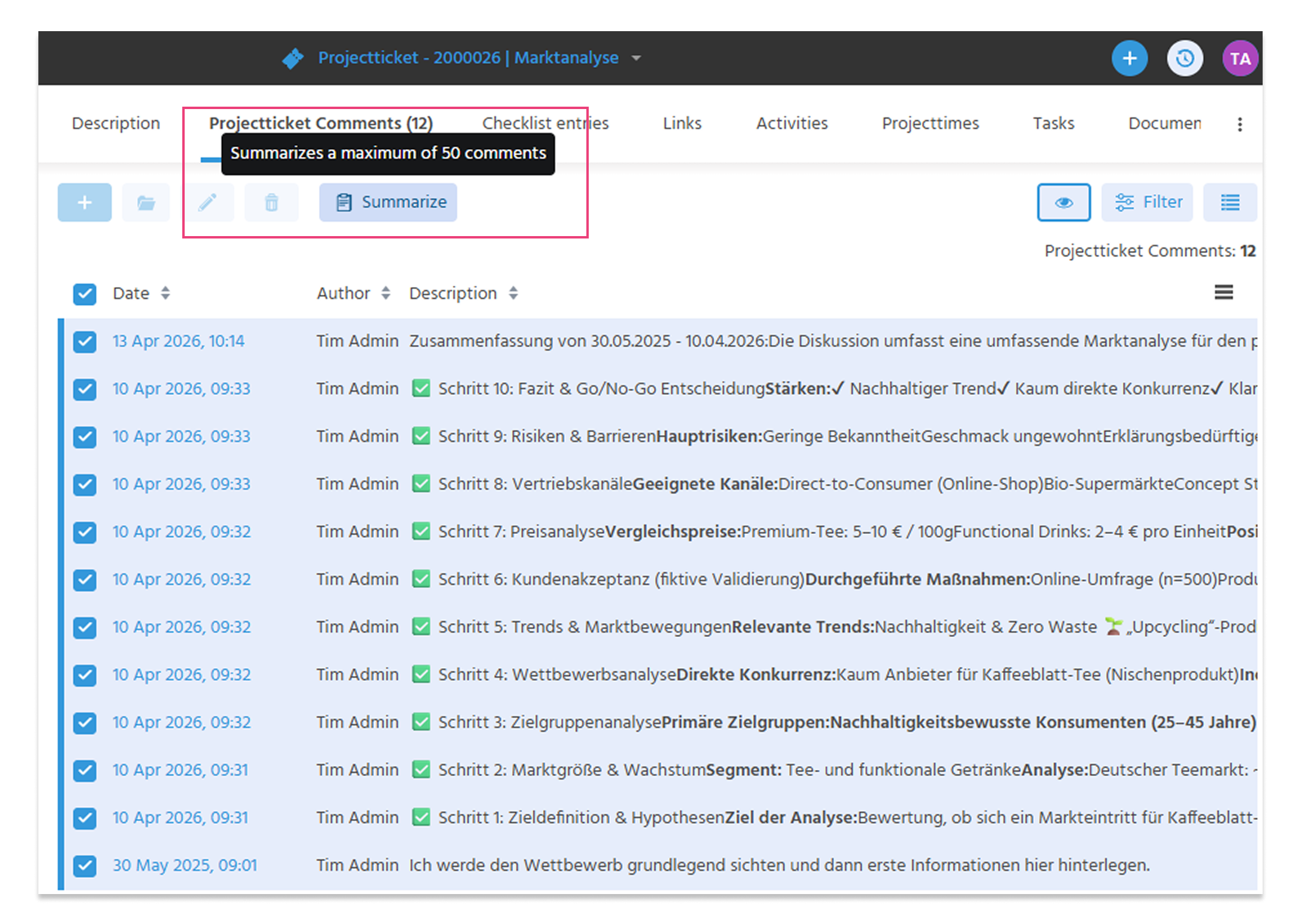
The AI “Summarize” feature was first introduced for activities in the xRM 2025.9.0 release. This feature is now also available for project tickets. Users can automatically summarize multiple posts in a project ticket and then further edit the result in the editor. This provides a concise overview of the current ticket status in just a few seconds.
Up to 50 ticket posts can be included at once. This allows you to quickly get an overview even for extensive tickets or tickets requiring extensive discussion, without having to manually go through individual posts.
_202640-2df190deb7172b5fc69ccf234ee719d3.png)
- The time period covered by the summarized posts is displayed
- The summary can be further edited using the editor's AI tools and saved as a new post
ℹ️Further informationen: PDF EN
🚀Create performance reports via email in no time with AI
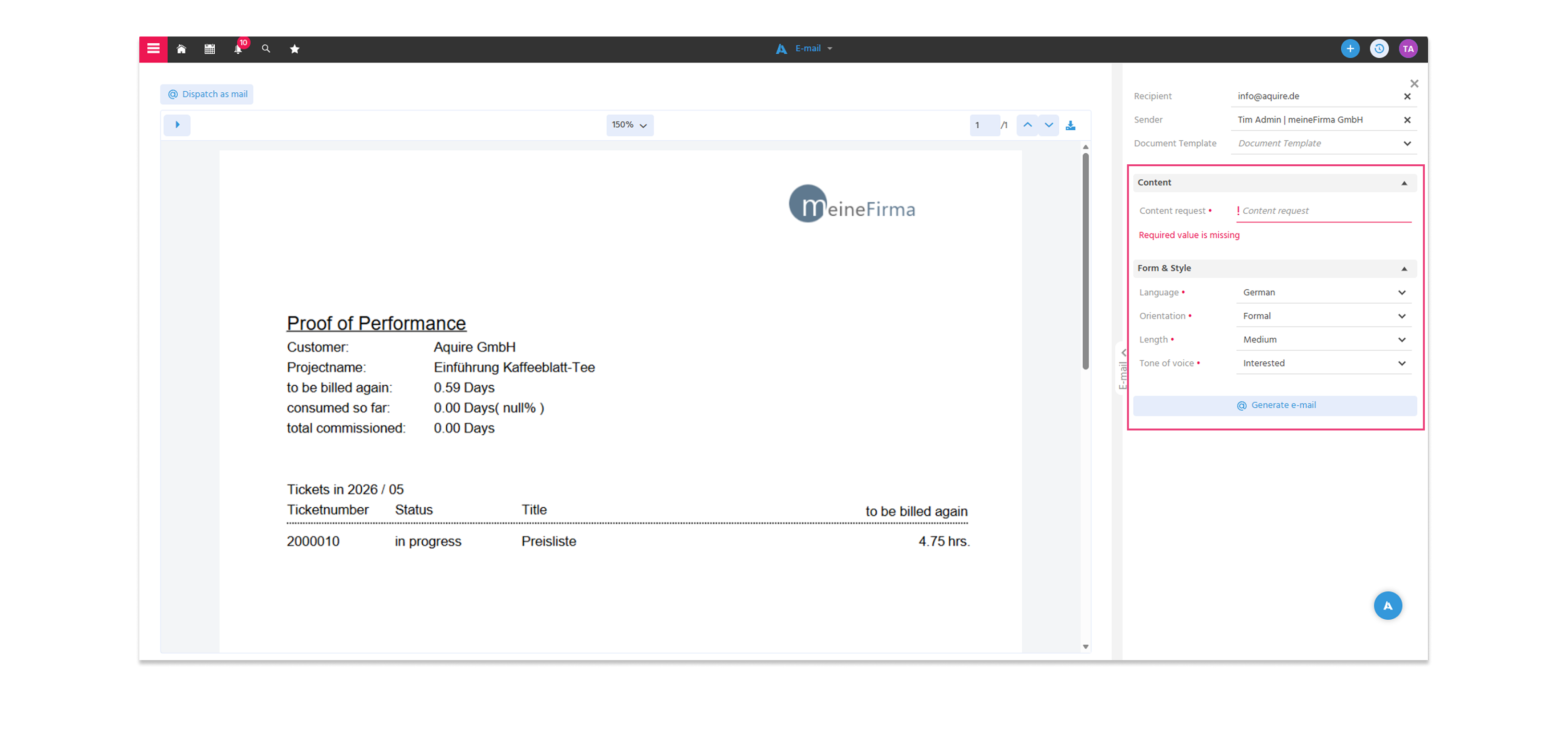
Automated email content generation is now also available for sending performance reports. Using the “Content Request” field, users can generate a suitable email by entering just a few keywords. This simplifies and speeds up the process of creating text when sending performance reports.
ℹ️Further informationen: PDF EN
🚀 Improved prompt quality for more reliable results
The underlying prompts used for generating emails and summarizing activities have been revised, enabling users to benefit from more reliable results. In particular, the linguistic quality of email generation has been significantly improved and is now more consistent and context-aware.
ℹ️ AI for Everyone: The INTERNAL_AI Role Is No Longer Required
ADITO has decided that AI features can now be used and deployed without an additional license. As a result, the dedicated INTERNAL_AI role is no longer required and has been removed from the xRM codebase.
Minor changes across all areas
🚀 Mailto Functionality for Mobile Clients
On smartphones and tablets, users can now tap an email address to automatically open the email app installed on their device, with the selected recipient already pre-filled. This significantly improves usability, as users can start communicating more quickly and intuitively without any additional steps.
ℹ️Further informationen: PDF EN
🚀 Better Overview with Public Tags
Public tags are now enabled by default. This allows users to easily add #tags (e.g., #TopCustomer) to any records—such as companies, contacts, opportunities, service tickets, or knowledge articles—to clearly categorize them and quickly find them again using the index search. All public tags used are available to all users system-wide.
ℹ️Further informationen: PDF EN
🚀 Goodbye, “cell phone (Handy)”
The outdated term “cell phone (Handy)” has been replaced with “mobile” in the contact information of German systems. This ensures that the wording is up-to-date and easy to understand.
🚀 Correct Display of Placeholders
The handling of placeholders in emails, letters, and other document templates has been improved: Placeholders are now case-insensitive.
This means it no longer matters to the user whether placeholders are written in uppercase or lowercase. Formats such as {@contactid} or {@contactId} are treated identically; the corresponding data record is inserted correctly in both cases.
- Fewer sources of error
- Greater flexibility when entering data
- Correct display of content
Technical changes
🔧 Improved Performance with Large Data Sets in the Company Context
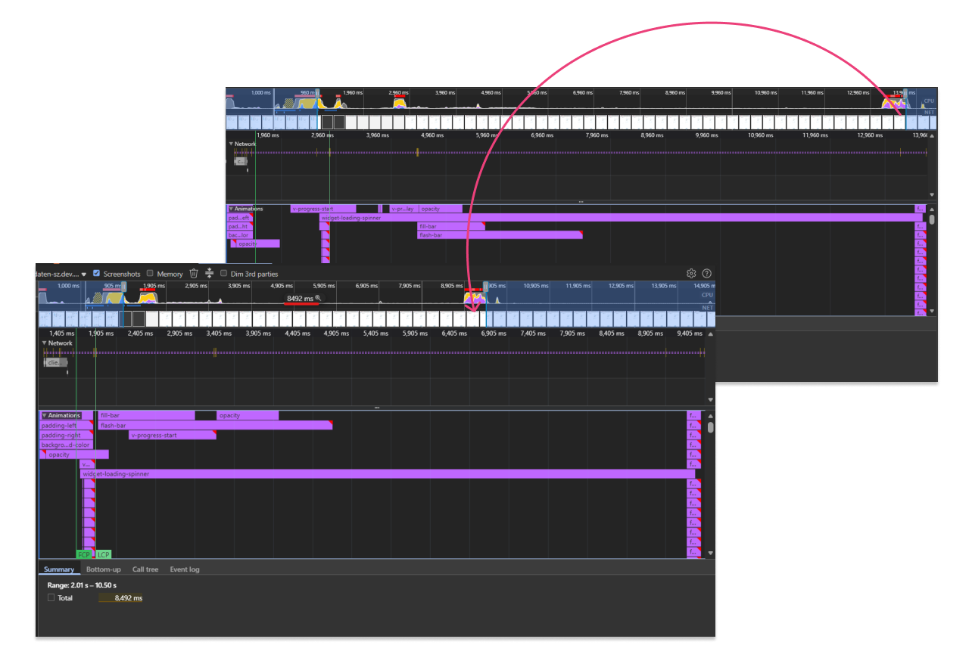
To ensure that xRM continues to perform well even with very large datasets (e.g., >100,000 companies), targeted optimizations have been implemented at the database and application levels in the Company Context.
- Database queries when using the context have been optimized so that significantly fewer and faster queries are executed.
- At the application level, property filters were previously recalculated repeatedly when the filter view was called, which was unnecessary since the values do not change during operation. Caching is now used here, and the values are calculated only once to reduce loading time.
Performance tests were conducted with large data sets, and the load time was reduced from approximately 12,700 milliseconds to approximately 8,500 milliseconds, resulting in a time savings of about one-third.
🔧 ESLint-compliant codebase
As part of our quality assurance process, our goal is to deliver modules that are ESLint-compliant. We have already completed the necessary refactoring for approximately 75% of the modules in xRM.
ESLint is a tool for automated testing of JavaScript code and offers the following benefits:
- Error prevention & operational reliability: Detects potential errors, messy structures, and inconsistent coding styles early on, before problems arise during operation.
- Improved readability & consistency: Ensures a uniform, clearly structured codebase and reduces technical errors and warning messages.
- Higher software quality: Increases the stability and maintainability of the project by reducing complexity in relevant areas.
- Easy extensibility: Facilitates the expansion and scaling of the project in the long term.
🔧 Modularization
New Override Option for Libraries
Utility version 4.1.0 introduces a new library that allows you to selectively override individual functions from third-party module libraries. This enables more flexible and modular customizations without having to modify the original code directly.
ℹ️Further informationen: New in Utility Module - Targeted Library Overrides | ADITO platform
Creating Quotes Without Opportunities
If a customer does not want to use opportunities to support their sales process but still wants to generate quotes via xRM, this is now possible. The Quote module can now be used as a standalone module in a project without the “Opportunity” module being present.