Release Notes 2026.4.1

xRM minor releases aim to fix bugs that arose during a major version. Below you will find selected features, bug fixes, and important information.
Contact Management
🚀 Validation of E-Mail Addresses
The validation of input fields for E-Mail addresses has been revised and standardized system-wide. During entry, the system now automatically checks whether the entered E-Mail address complies with the format of the international standard RFC 5322.
Users can therefore only save correctly formatted E-Mail addresses system-wide. Invalid or incomplete entries are detected during input and can no longer be saved.
This improves data quality and reduces issues when sending E-Mails in automated processes.
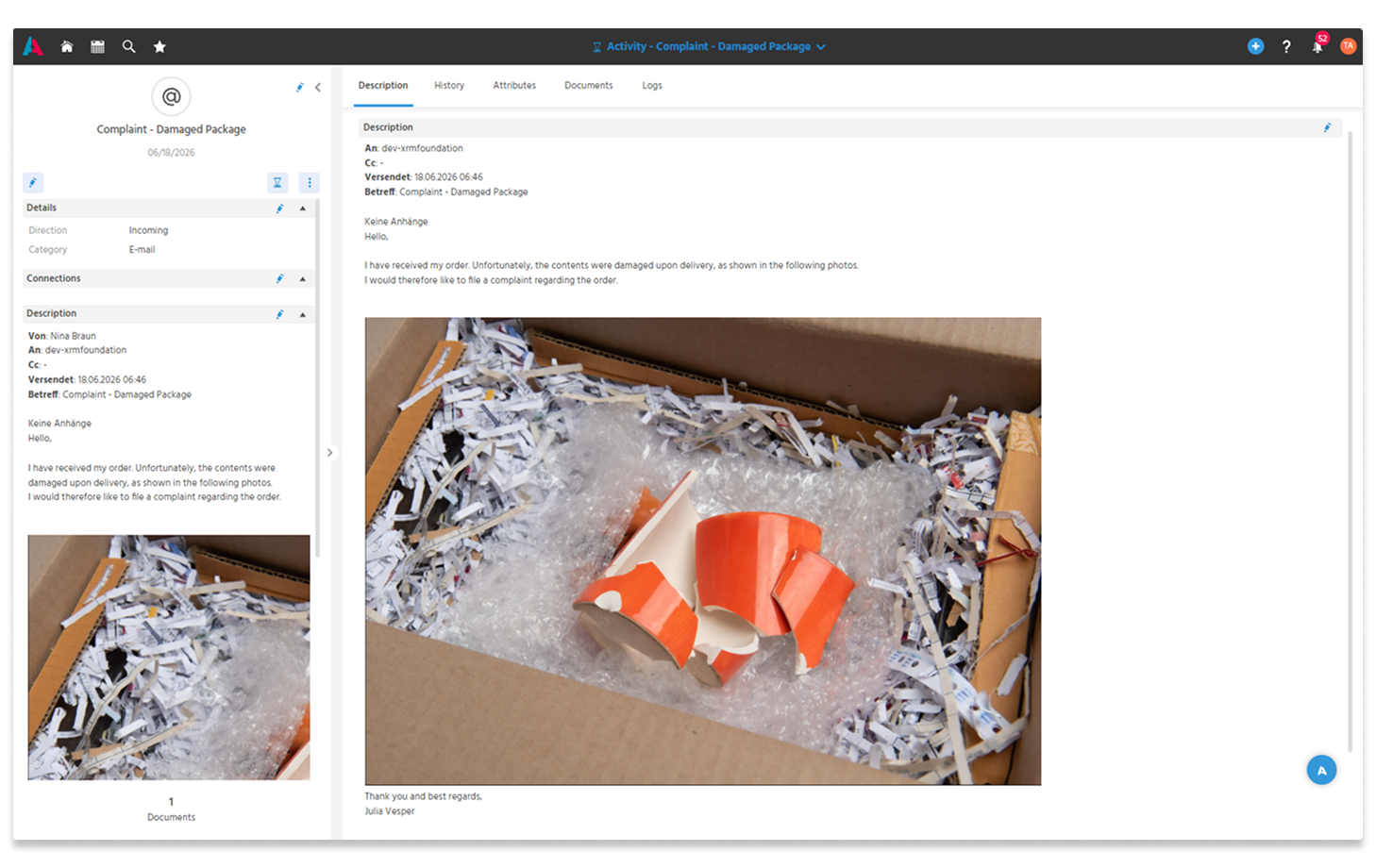
🚀 Inline Images in Incoming E-Mails Displayed Directly in Activities
Incoming E-Mails that contain images directly in the message body (inline images) are now correctly displayed in Activities from the Activity Mailbridge or in the mail Dashlet. Users can view content such as screenshots or embedded graphics directly in the created Activity. This improves the traceability of E-Mail content and makes processing easier, as relevant information is fully and visually correctly available.
ℹ️Further informationen: PDF EN
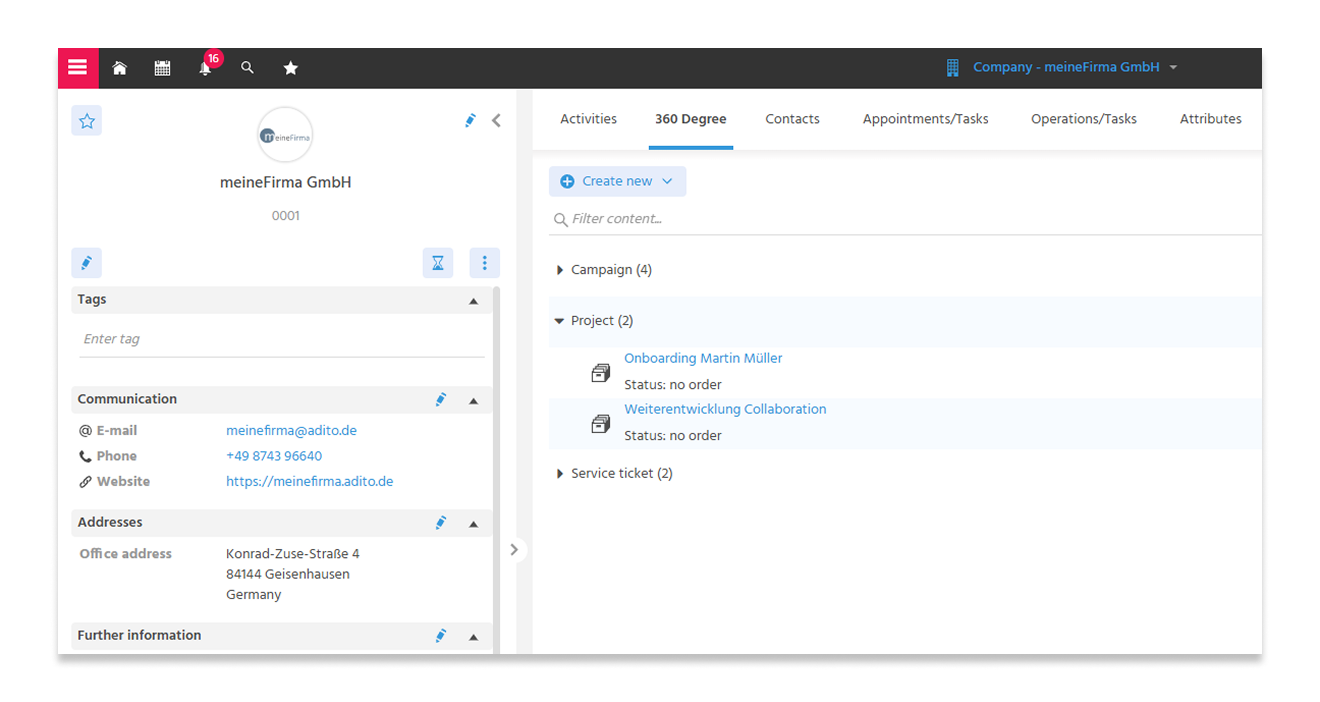
🚀 View Projects of a Company Directly in the 360° View
The 360° view of a Company now also displays linked projects. The view has been completed so that information no longer needs to be searched in other areas.
🚀 Company Export Including Linked Contacts Now Possible
Users can now export Companies together with their linked Contacts. This makes it easier to provide company data including contact persons for analyses, data migrations, or further processing in other applications. Previously, only export from the Contact perspective was possible, which included the respective Company.
ℹ️Further informationen: PDF EN
Sales
🚀 Tab "Digital Signature" Removed from Contracts
The previously existing tab "Digital Signature" has been removed from contracts to make the contract view clearer and simplify further document processing. The function is no longer needed from a business perspective, as contracts are not created in the CRM. This resulted in a workflow related to the digital signature that had no practical use case. By removing the tab, the user guidance has been optimized at this point.
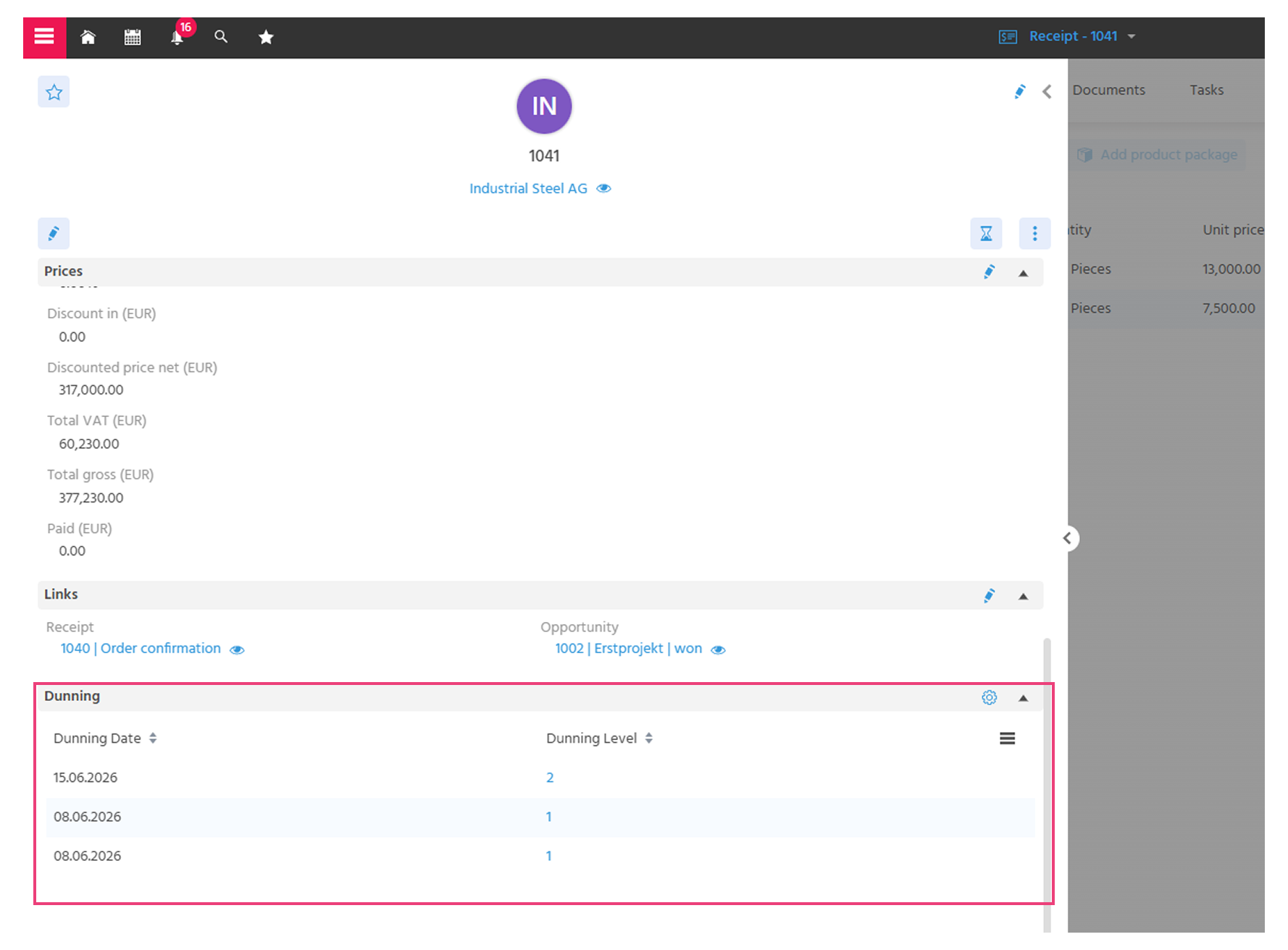
🚀 Dunning History Now Visible Directly in the Receipt
The dunning history has been functionally and structurally optimized to make daily use easier and more intuitive.
- Users can now view dunning status information directly in the respective Receipt in the "Dunning" area. This makes all relevant information available exactly where it is needed in the processing workflow.
- The previous Context and tab "Dunning History" at Company and system level is removed.
ℹ️Further informationen: PDF EN
🚀 Notice When Creating a Receipt from Offers with Optional Items
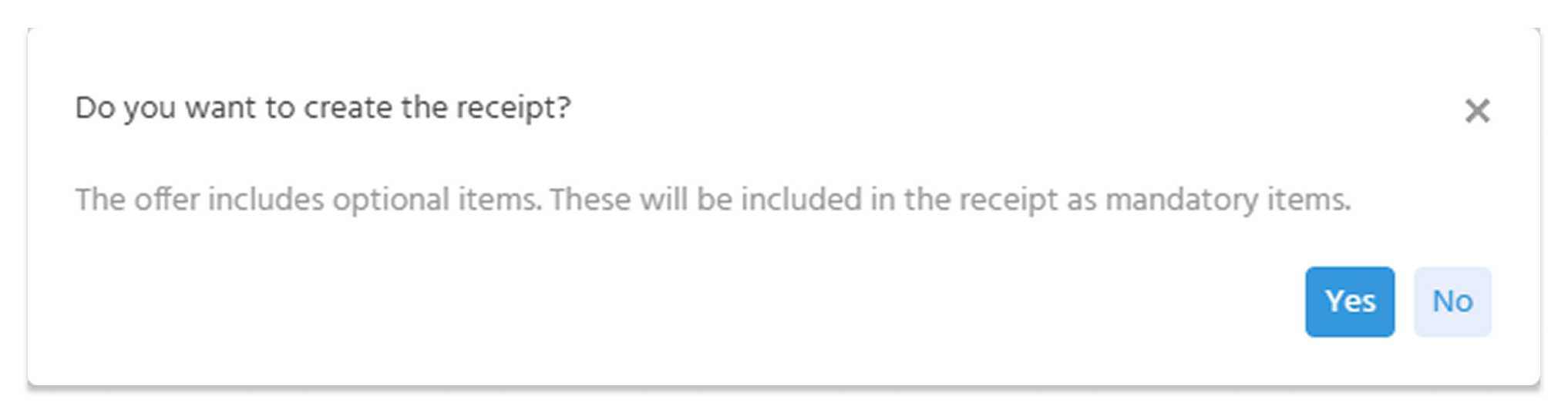
Users are now automatically notified via an overlay when creating a Receipt from an Offer that contains optional Offer Items. Previously, these items were transferred to the new Receipt as regular items without any notice, which could lead to misunderstandings during further processing or when checking totals.
A clear notice now appears before the Receipt is created, allowing users to directly decide whether the Receipt should be created. If the optional items should not be transferred, the overlay is closed by clicking "No", the optional items are removed, and the Receipt creation is performed again. This prevents the unintentional transfer of optional Offer Items.
ℹ️Further informationen: PDF EN
🚀 Contact Person Introduced as Required Field in Offers and Receipts
The field "Contact Person" has been newly introduced in Offers. The field specifically references internal employees and is a required field.
- Improves assignment and accountability in Offer management
- Users can filter by their own or assigned Offers, create individual Dashlets, and manage responsibilities
- When creating a new Offer, the currently logged-in user is automatically set as the contact person
In Receipts, the "Contact Person" field has also been restricted to the selection of employees instead of any contacts.
ℹ️Further informationen: PDF EN
🚀 Price Calculation for Products with Bill of Materials Standardized
The pricing logic has been simplified and standardized. For products with a maintained bill of materials, the price is now always automatically calculated from the bill of materials. The toggle button that allowed opting out of bill-of-materials-based pricing is no longer available, as it could result in different prices between the product definition and the Offer.
Benefits for users:
- Consistent and transparent price calculation
- No discrepancies between product price and Offer price
- Less manual maintenance effort
The adjustment ensures that prices for products with a bill of materials are calculated consistently and transparently based on the stored components.
ℹ️Further informationen: PDF EN
🚀 New Information Field for Conditions
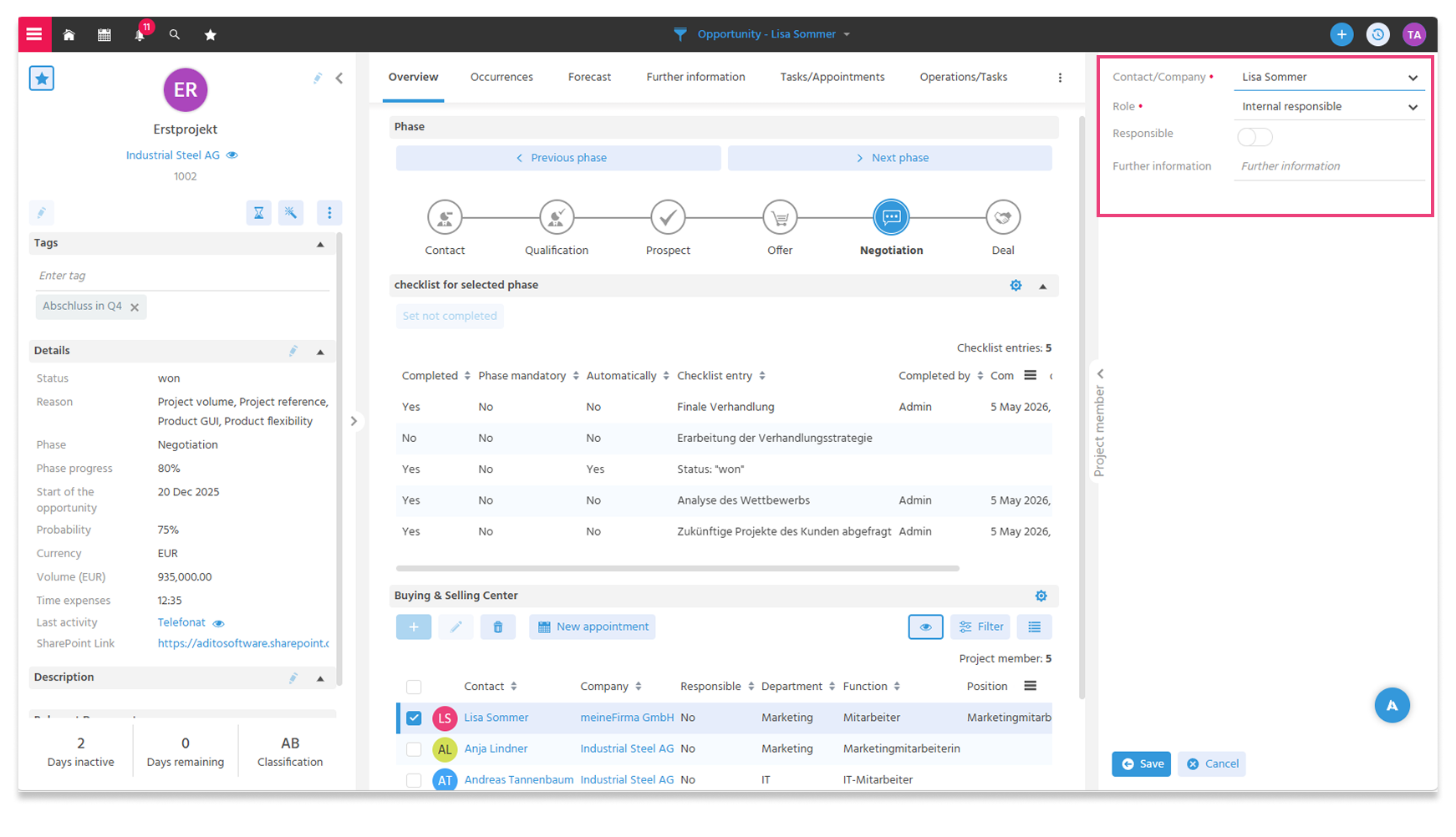
A new text field "Information" is now available in the conditions.
Users can centrally store relevant notes in the new field. This provides more transparency about how specific pricing agreements were established and what they are based on. The additional information addresses the pain point that it was often time-consuming or difficult to trace why certain conditions were agreed upon, as they were frequently scattered across contracts, E-Mails, or verbal agreements. This led to uncertainty, especially during handovers or when reviewing later.
ℹ️Further informationen: PDF EN
🚀 Opportunity Status Automatically Adopted from Offer Status
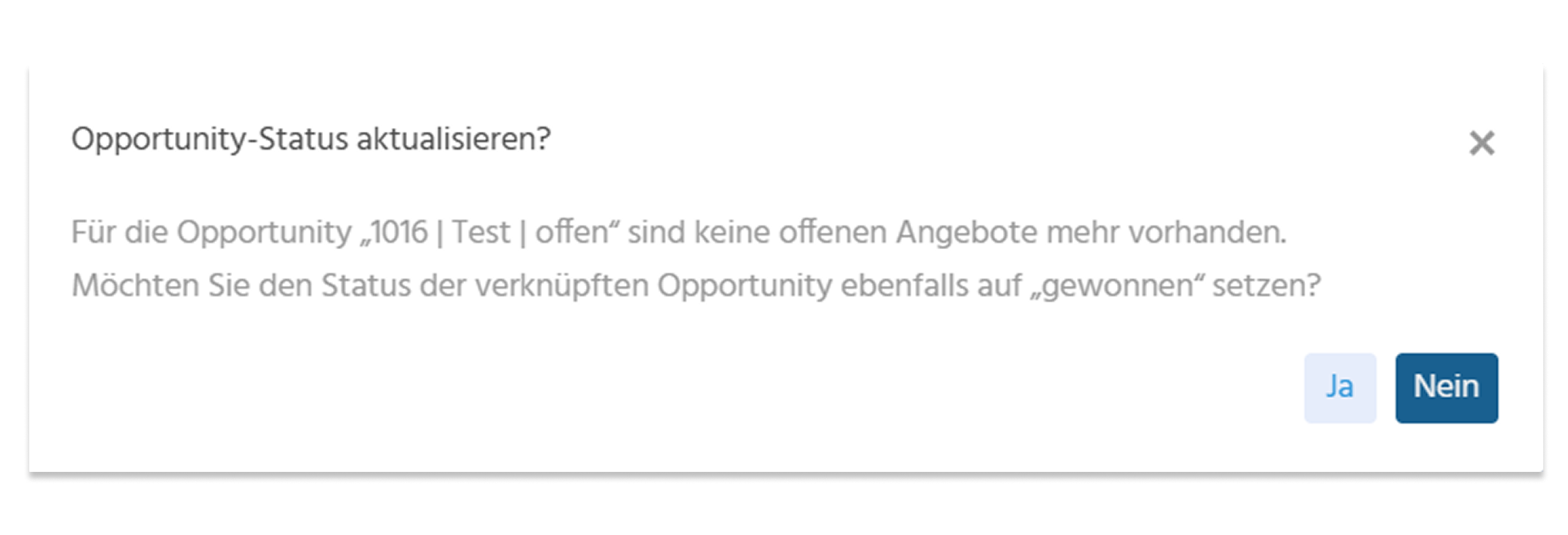
Users occasionally forget to update the Opportunity status after closing the last open Offer, which is why this maintenance has been simplified. As soon as the last open Offer of an Opportunity is set to "won" or "lost", a dialog automatically appears to update the associated Opportunity. The user is asked whether the status of the linked Opportunity should also be set to "won".
Benefits for users:
- Less manual maintenance effort
- Synchronized status between Offers and Opportunities
- Improved transparency over actual sales progress
- Reduction of forgotten or incorrect status updates
ℹ️Further informationen: PDF EN
🚀 New Filter "Duration in Days" for Opportunity
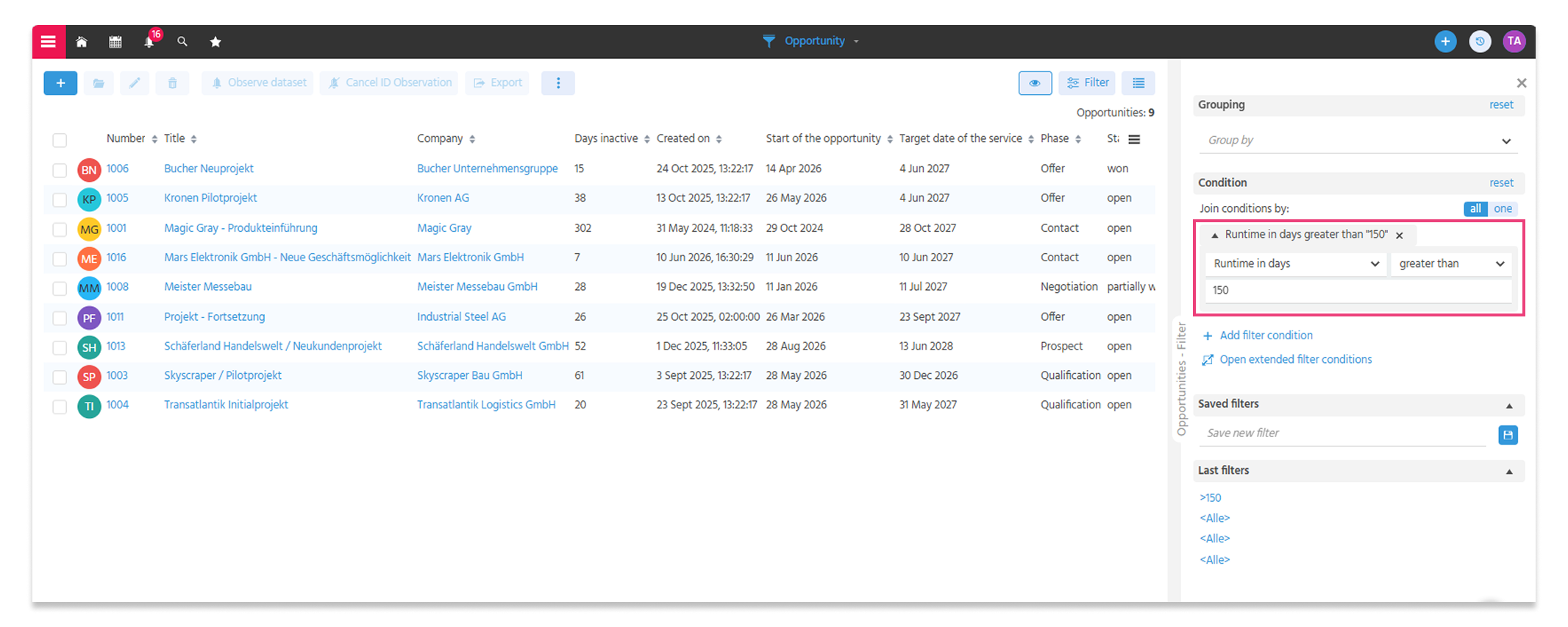
The new filter "Duration in Days" is now available in the Opportunity FilterView. Previously, it was only possible to filter by the start or target date of an Opportunity. With the new filter, a specific time period between the start and target date can be filtered, for example for a duration of 150 days.
The duration of an Opportunity is an important metric for users to better evaluate and prioritize sales processes.
Selecting "Duration in Days equals empty" displays all Opportunities that have no start and target date stored.
🚀 Persons Instead of Companies in the Buying and Selling Center
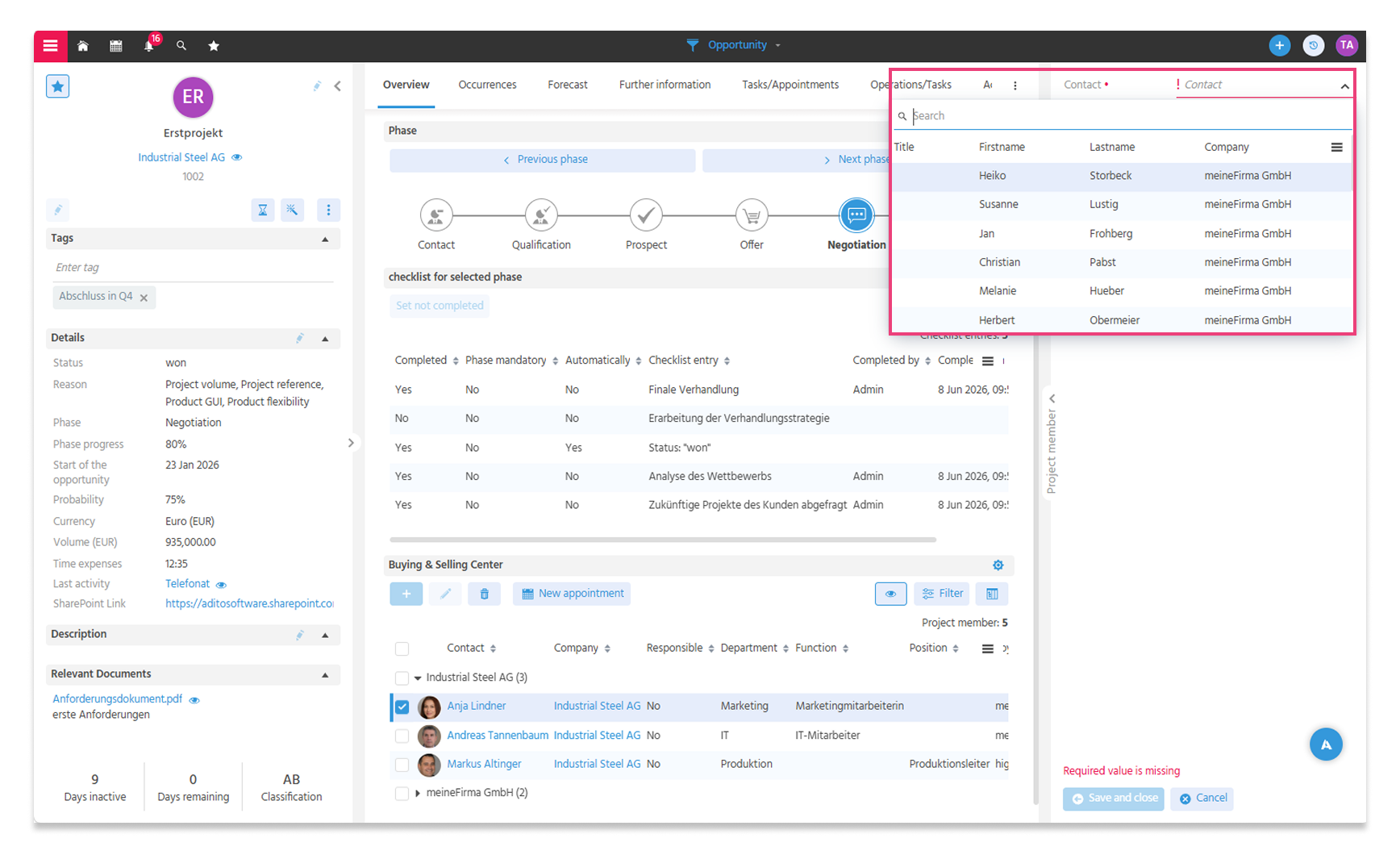
In the Buying and Selling Center, users can now only store Contacts, instead of also being able to store a Company without a Contact as before. This makes it clearer which persons are involved in an Opportunity, who influences decisions, and with whom active communication is required.
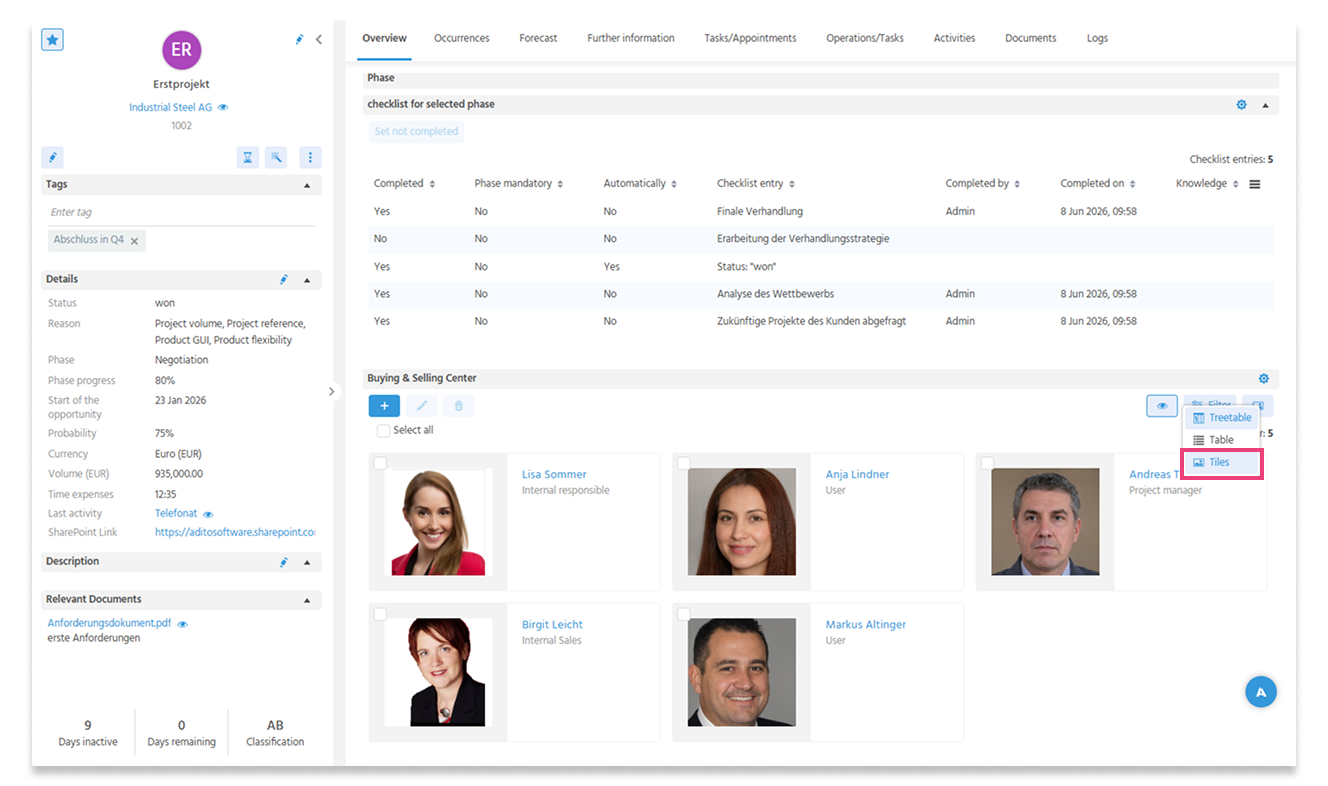
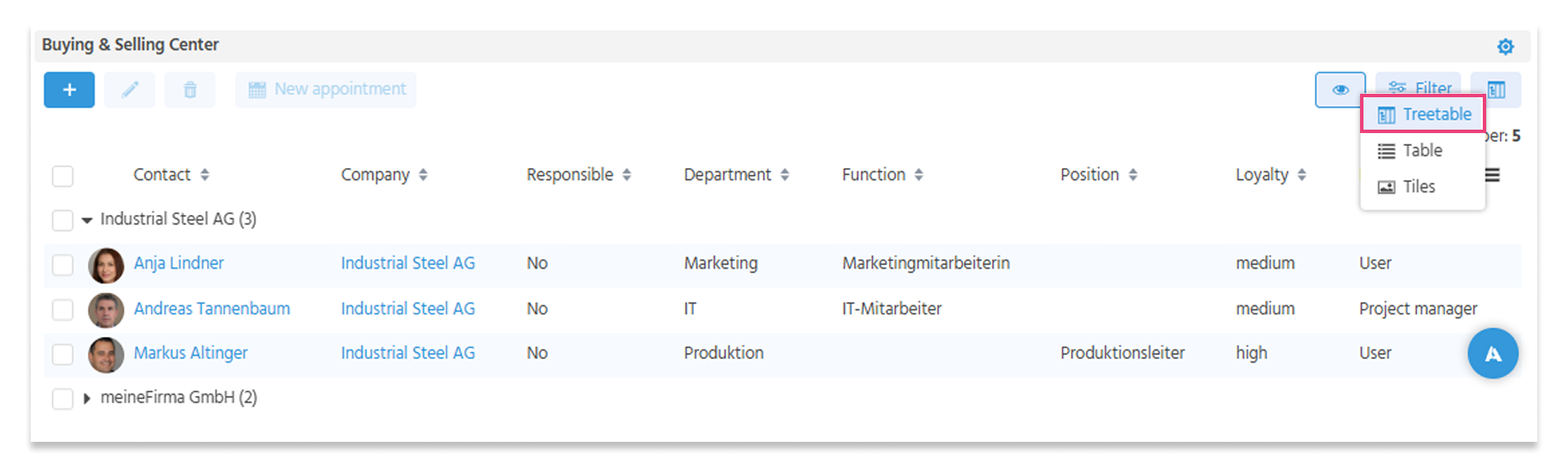
🚀 New Views in the Buying and Selling Center
Two new display modes are now available in the Buying and Selling Center:
- The new tiles view provides a compact and visually supported overview of all relevant stakeholders. In addition to profile pictures, names, roles, additional information (for example, Buying Center or internal Project Team) and contact details are displayed. This allows users to identify conversation partners more quickly and prepare more specifically for appointments.
- Additionally, the new treetable view provides more structure by allowing Contacts to be grouped by Company. Especially for more complex Opportunities, it remains clear at all times which Contacts belong to which organization.
The new views create more transparency, facilitate conversation management, and support professional preparation and execution of appointments.
ℹ️Further informationen: PDF EN
🪲 Display and Linking of Offers in Opportunities Corrected
The separation of the "Offer" and "Opportunity" modules in Release 2026.4.0 led to a bug: linked Offers were no longer displayed in the Forecast of an Opportunity. Additionally, Offers from Companies could be linked to Opportunities of other Companies, which could lead to incorrect assignments.
The behavior has been corrected and the original functionality restored:
- Linked Offers are now correctly displayed in the associated Opportunity again.
- When creating an Offer, only Opportunities of the same Company can be selected.
Marketing
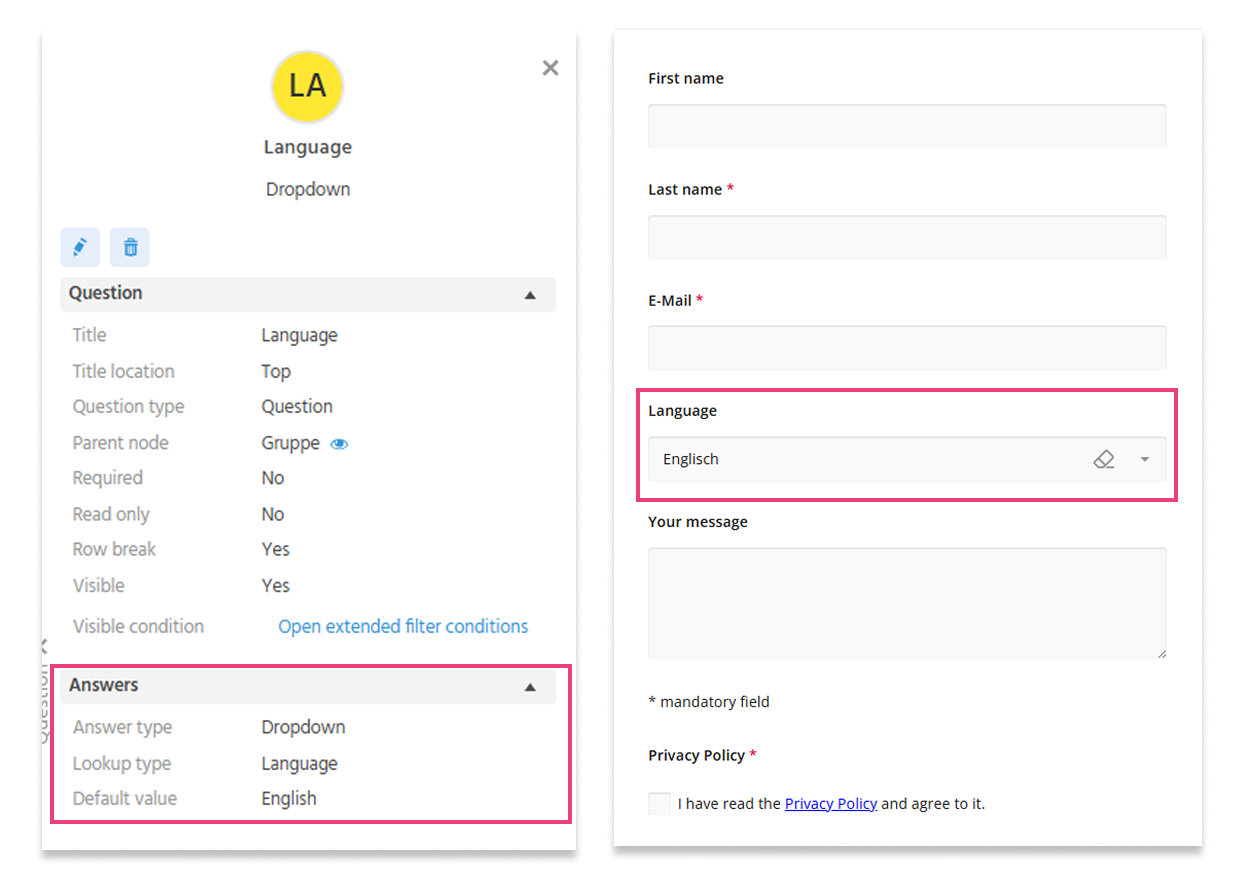
🚀 Pre-Filled Values in the Questionnaire Now Possible
Fields in the questionnaire can now be pre-filled with a default value.
This means that users no longer need to manually enter frequently used language selections with each new entry. Especially in situations with many consecutive Contacts, such as at trade fairs or events, data entry becomes significantly faster and more convenient.
Pre-filling is possible for the following values:
- Keyword
- Language
- Country
- Attribute
🪲 Correct Preview URL for Surveys
The preview function for surveys now reliably opens the questionnaire via the stored URL. Where required, the ContactId of the respective user is automatically taken into account, e.g. for non-anonymous surveys.
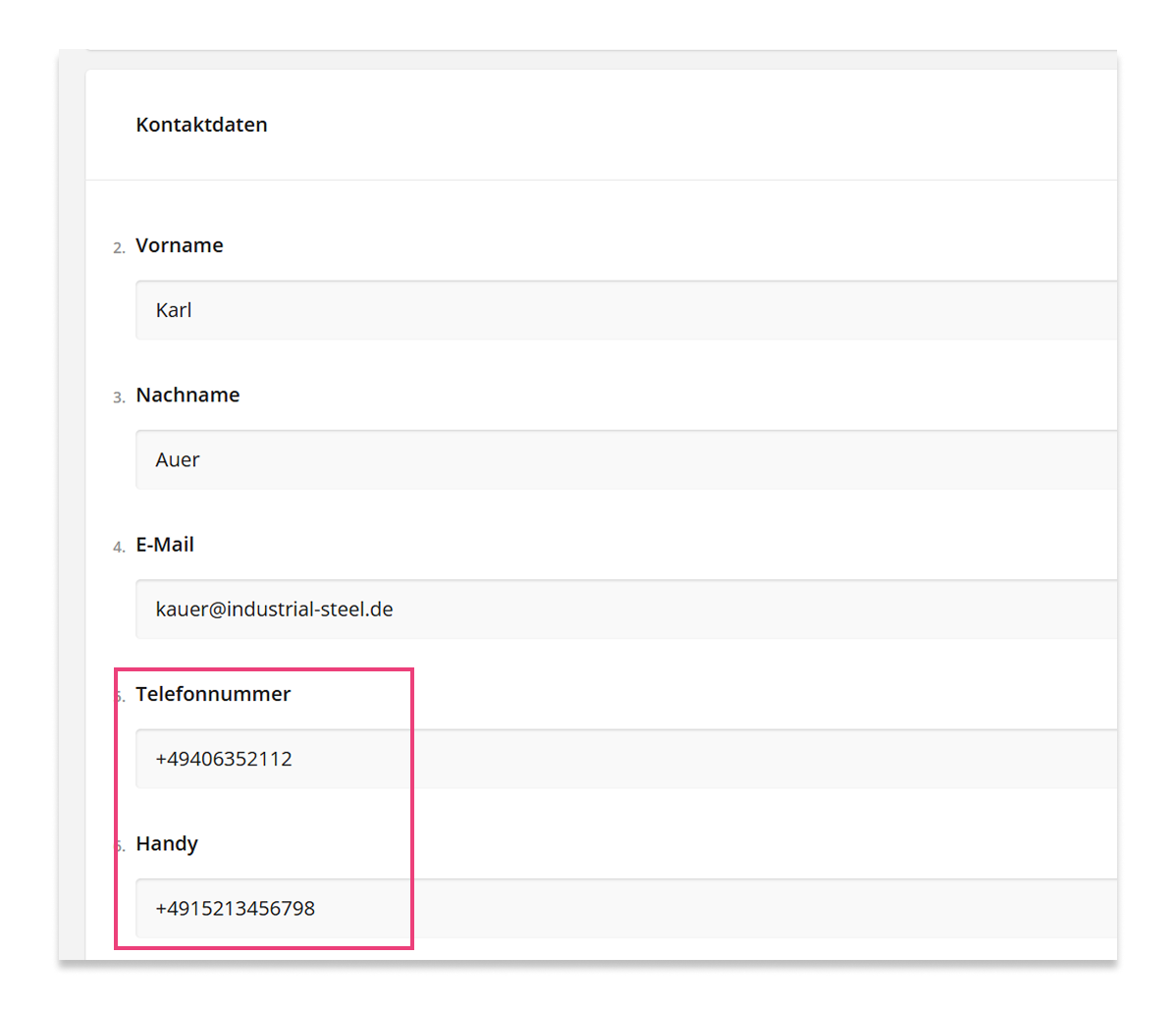
🪲 Transfer of Mobile Numbers During Business Card Scan Corrected
The processing of phone numbers when using the business card scan in forms has been improved. Mobile phone numbers are now correctly recognized and transferred to the designated fields.
Previously, an issue occurred when a business card contained both a phone number and a mobile phone number. In these cases, the mobile number was not reliably transferred.
Additionally, the default logic has been optimized: if a user saves both a phone number and a mobile number, the mobile number is automatically set as the default.
AI
🚀 Optimized AI-Assisted E-Mail Generation
The AI-assisted E-Mail generation has been optimized: in some cases, no suitable response could be created, or the generated E-Mail was output in a different language despite the selected language, e.g. in English instead of German. The desired text length was also not always fully taken into account.
By revising the underlying prompt, the E-Mail generation now works significantly more reliably:
- The selected language is correctly applied to generated content
- The content and linguistic quality of the AI output has been further optimized
- Additional information such as relevant Activities and context data are more strongly incorporated into the generation to provide even more precise and professionally appropriate results
🚀 Optimized AI-Assisted Opportunity Evaluation
The BANT evaluation has been further optimized in the "Authority" area to make the assessment of decision-making structures more transparent and improved.
Previously, the "Authority" criterion could be evaluated as fulfilled even when no external persons were present in the Buying and Selling Center. The evaluation logic has therefore been adjusted: if no external participants are present, "Authority" is now correctly evaluated as not fulfilled. Additionally, the distinction between internal and external persons is now made based on their respective Company assignment.
The "Further Information" field is now also included in the evaluation. This allows additional context information to be better taken into account, leading to a more well-founded assessment. Additionally, the language issue has been fixed; the evaluation now reliably occurs in the respectively selected language.
Demo Data
🚀 Images in Bulk Mails and Mosaico Templates Loaded System-Dependently
The provision of images in bulk mails and Mosaico templates has been improved for the creation of demo systems and demo data.
Previously, images contained in demo data always referenced a fixed Mosaico instance, regardless of which system the demo data was used on. If this central system was temporarily unavailable, images in bulk mails and Mosaico templates could no longer be displayed. Additionally, the same fixed Mosaico environment always had to be used when creating demo data.
With the adjustment, images are now loaded directly from the respective Mosaico instance of the current system. This makes content more reliably available and presentations can be conducted without dependency on an external system. Additionally, the creation and maintenance of demo data is simplified, as a fixed Mosaico environment is no longer required.
Technical Changes and Developer Information
🚀 More Stable Microsoft Graph Contact Synchronization Through Optimized Filter Processing
Previously, the same filter could be added multiple times via the action "Add to Synchronizations". The user interface displayed a successful status change, but in the background, entries were stored multiple times, which could block the entire contact synchronization with Microsoft Graph.
With the optimization, existing filters are now reliably checked and not added to synchronization multiple times. This makes synchronization significantly more stable and prevents the risk of contact synchronization failure for customers.
ℹ️ Guide for Configuring E-Mail Mailboxes
A guide has been provided for developers explaining how to set up the following E-Mail functionalities in a system:
- Mailbox for Marketing → E-Mail sending, Bounce Mailbridge
- Mailbox for Service → the Service Mailbridge and Service E-Mail sending
- Mailbox for Contact Management → Mailbridge for Activities
ℹ️ Update of the 360-Degree Documentation
An updated document is available for developers for customizations in the 360° view.
🔧 ESLint Warnings Resolved
As part of further quality assurance, ESLint warnings in the Product, Expense-Report, and Classification modules have been resolved. Affected functions were refactored and optimized with regard to their "Cognitive Complexity". The adjustments improved code quality and increased the maintainability and readability of the affected modules.
🔧 Transpile V2 Warnings Resolved
In the course of the transition to Transpile V2, existing warnings in the data models were analyzed and resolved. References to no longer existing data models were removed or corrected to current ones. The adjustments improve code quality and reduce technical warnings in the build and transpile process.