Send Test E-Mails
Marketing Managers can send test e-mails to selected recipients before the bulk mail is actually sent. The process for this is as follows:
| "Defining Recipients to Be Checked" | → | "Defining Test Recipients" | → | "Triggering Test Run" | → | "Check Test E-Mail Delivery" |
|---|
Defining Recipients to Be Checked
There is the option to specify which recipients should be used for the test e-mails in order to check the resolution of placeholders.
For this, the "Test Run Actions" button is available in the "Recipients" tab as soon as at least one recipient has been selected. The underlying Action "Use for Test Run" marks the selected recipients in the "Test" column with "Yes" as recipients to be checked. With the underlying Action "Don't Use for Test Run", selected recipients are removed from the group of recipients to be checked.
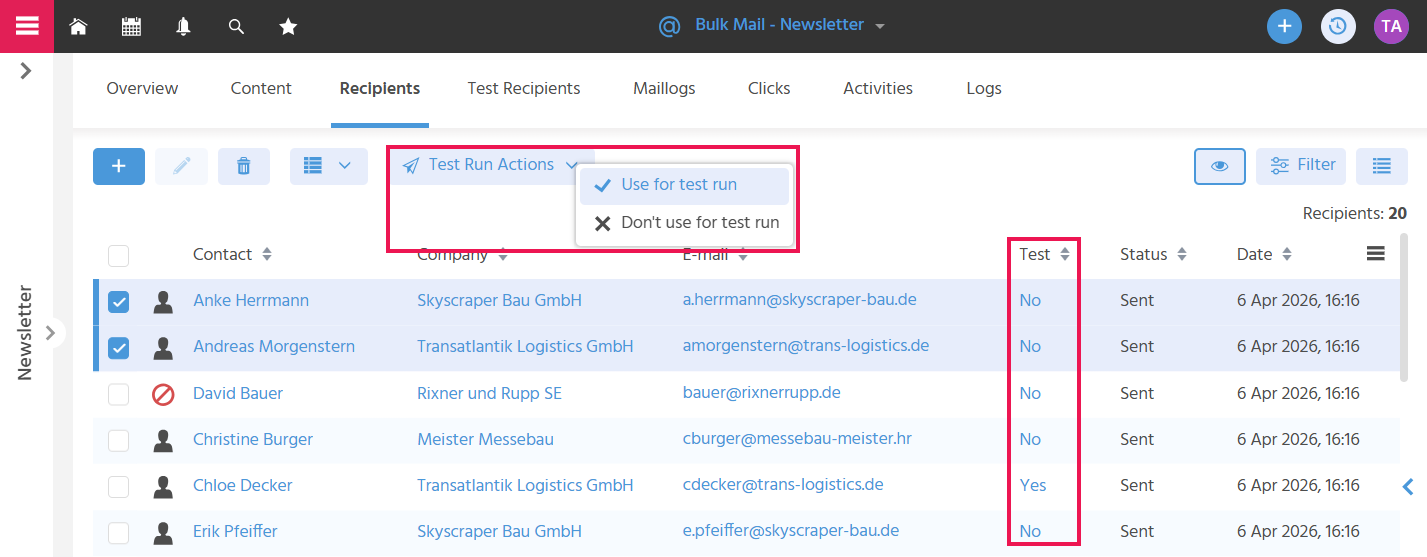
Recipients should be used for whom the placeholders contained in the bulk mail can be particularly well checked, e.g., contacts with a title or with a special letter salutation. If a letter salutation is stored on the contact, it replaces the placeholder {@letterSalutation@}.
The recipients marked in this way do not receive an e-mail during the test run. However, the actual recipients of the test e-mails receive one e-mail per recipient to be checked, in which they can verify whether the resolution of the respective contact placeholders is correct.
Defining Test Recipients
For the test run, recipients can be defined who are to check the general display of the e-mail, to ensure that all content in the outgoing e-mail is displayed as planned. To do this, the contacts who are to receive the test e-mails are added in the "Test Recipients" tab.
Triggering Test Run
Using the Action "Test E-Mail" (Further Actions button), a test run can be triggered in the bulk mail, to ensure by checking the test e-mail that the e-mail is correctly formatted, all content is displayed correctly, and no technical errors occur before the bulk mail is sent to the entire target group. When the Action is executed, e-mails are sent to all contacts stored in the "Test Recipients" tab — exactly as many as there are recipients to be checked defined in the "Recipients" tab. The person in charge of the bulk mail and the person who triggers the test run each receive a notification informing them how many test e-mails were successfully sent and how many failed.
Check the Test E-Mail Delivery
In the "Maillogs" tab, it can be checked to which test recipients the test e-mails were successfully sent and for which test recipients the delivery failed, in order to trigger the test run again if needed.
Marketing Manager Bulk mail