Performing Standard Actions
The standard Actions are located in the Action bar of the FilterView (as well as in other views). They are grayed out when they are not possible (no record marked) or not permitted (missing permission).
Opening a Record
A record can be opened directly from the FilterView using the Action with the folder icon, so that all details can be accessed quickly. This opens the MainView of the selected record.
Editing a Record
A record can be edited using the Action with the pencil icon, so that information can be updated and corrected. This opens the EditView.
Deleting a Record
A record can be deleted using the Action with the trash icon, so that outdated or incorrect entries can be removed from the system.
Copy Button for Links
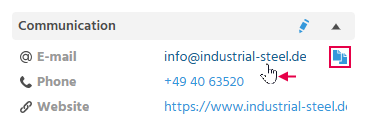
A copy button is displayed as soon as the mouse hovers over a link, a phone number, or an E-Mail address, so that the content of this line can be quickly copied to the clipboard. The copy button is only available in the desktop view.