Checking the Settlement for Correctness and Finalizing
The person responsible for processing the settlements now checks the submitted trip data and receipts and, depending on the result of the check, either returns the settlement to the requester or finalizes it.
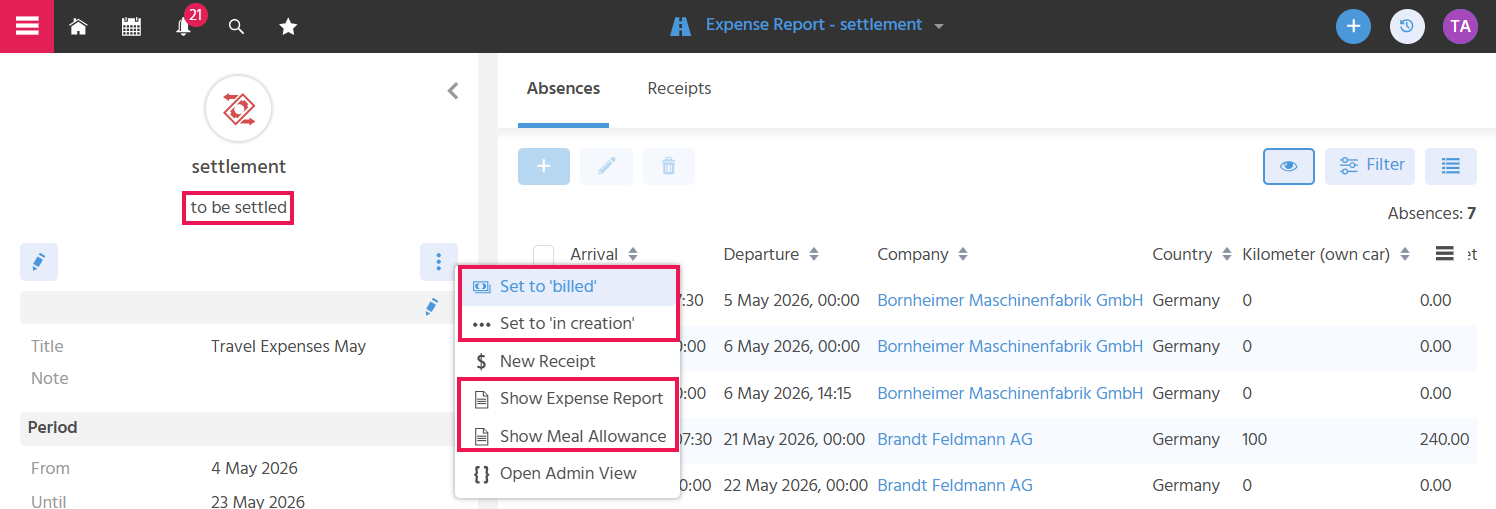
Viewing the Expense Settlement
The action "Show Expense Report" opens a document that clearly lists all overnight stays, kilometers driven, and individual receipts. In addition, the totals of the overnight stay allowances, the kilometer allowance, and all individual receipts are combined into a grand total. The accounting department or the tax advisor's office can use the document to review the recorded data and as a basis for calculating/transferring the correct reimbursement amount.
Viewing the Meal Allowance
The action "Show Meal Allowance" opens a document that clearly lists the individual travel days with their respective deduction conditions and the resulting meal allowances per day. At the end of the document, the total of the meal allowances is shown. The tax advisor's office can use the document to review the recorded data and as a basis for calculating the correct reimbursement amount.
Returning for Correction
If the settlement contains errors or is incomplete, the status can be reset to "In Creation" so that the submitting person can make corrections and resubmit the settlement.
Marking the Settlement as Paid
If the settlement is correct and the payout has been made, the status is set to "Billed" to finalize the settlement. It is then no longer possible to make any further changes to absence or receipt records. Nor can the status be changed at this stage.
The actions "Set to Billed" and "Set to In Creation" are active for all users who have access to the "Expense Report" Context. They are displayed when the status of the settlement is "To Be Settled".