Following Up on a Visit
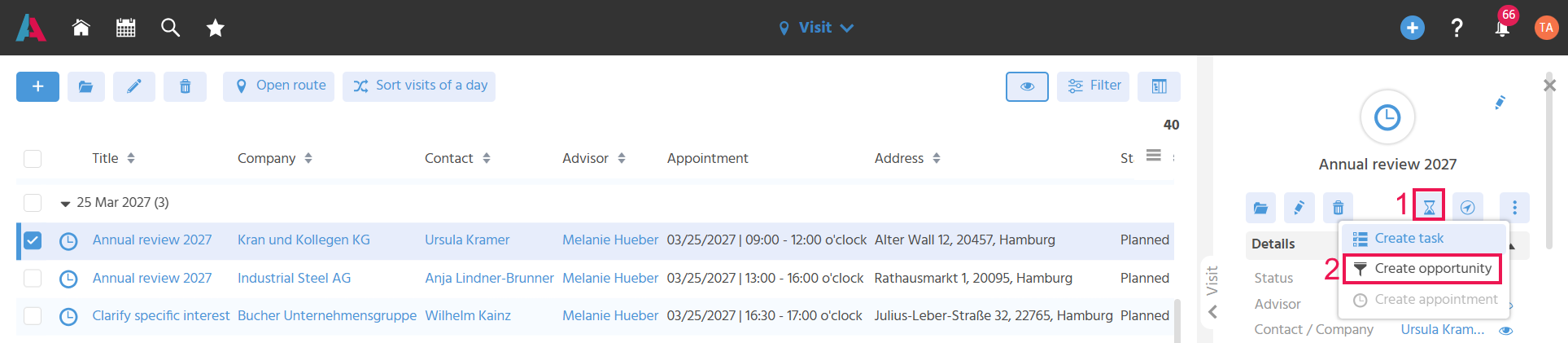
The Sales Executive can document the visit (1) and, if necessary, create an opportunity directly from the visit (2).
Identifying Undocumented Visits
Undocumented visits can be filtered so that no open follow-up work is forgotten.
To check whether visits are still open for follow-up, filter for past visits (date less than Yesterday's date) with the status "Planned".
Documenting a Visit
An activity can be created from a visit to document the content of the visit. To do this, the Action "New Activity" (hourglass) is executed in the preview of the visit. The EditView of the activity opens, in which the category "Visit" is preset automatically and the visit, contact and company are linked. For activities with the category "Visit", the system sets the status of the visit to "Documented" as soon as the activity has been created.
If you create a task for later directly after or during the visit ("Further Actions" in the preview, Action "Create Task") and note the most important points in it as a reminder, nothing important is forgotten.
Capturing an Opportunity
An opportunity can be created from the visit so that a sales opportunity arising from the visit can be captured directly. For this purpose, the Action "Create Opportunity" is available under "Further Actions" in the preview.
Sales Executive Visit