Deleting/Anonymizing Data
Here, System Managers and Data Privacy Agents control when datasets marked for deletion are actually deleted or anonymized. The deletion/anonymization process runs automatically at fixed intervals or is triggered manually when needed.
Configuring the Delete Delay
The delete delay specifies how many days a deletion indicator must be set before the deletion process can actually delete a dataset. This provides a review period for automatically set deletion indicators: within this period, an automatically or manually set deletion indicator that may have been set incorrectly can be removed again.
The delete delay is adjusted in the "Data protection administration" Context via the "General configuration for Deletion" Action. In the "Configurations for deletion" dialog, the current setting is displayed in the field "Delete Delay in Days". The desired value is entered there and applied with "Save".
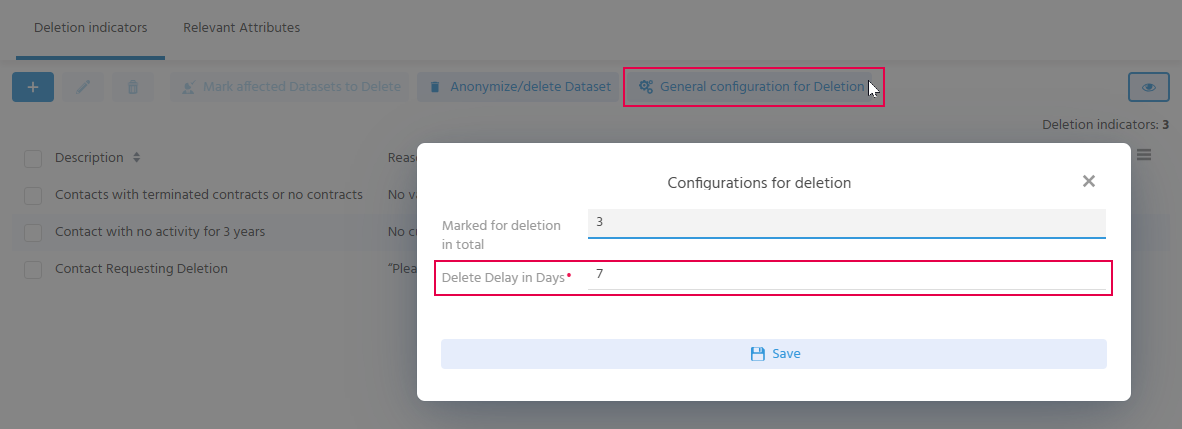
The number of days is set to 7 by default and can be adjusted.
⚙️ → Alternatively, the value is maintained in the keyword DSGVOConfiguration.
To do this, the preview of the keyword "DSGVOConfiguration" is opened in the "Keyword Entry" Context and the value for "Delete Delay in Days" is edited in the area "Keyword Attribute Values".
Running the Automatic Deletion/Anonymization Process
The deletion/anonymization process is usually executed automatically at fixed, defined times. Contacts that are marked for deletion are thus deleted or anonymized without manual effort. The prerequisite is that the deletion indicator has been set for at least the duration of the delete delay.
⚙️ → Depending on the amount of data, the Process can be executed e.g. daily or weekly at 02:00. These settings can be adjusted in the Process DSGVOAnonymize_serverProcess.
In xRM, the "Contact" Context is delivered with the dependent Contexts "Activity", "Task", "Service ticket" and "Advertising material". The following data is therefore anonymized or deleted:
Data to be anonymized
The First Name and Last Name of the contact are anonymized.
The original entries are replaced by the anonymization string *****.
Data to be deleted
All data that is not required for calculations in other Processes is deleted:
- Log entries
- Activities (incl. links, documents, attributes and log entries of the activity)
Activities that are linked to several contacts are deleted completely as soon as one of these contacts is affected by the deletion process. The activity is therefore also deleted for the remaining contacts. - Tasks
- Communication media
- Birthday
- Addresses (the addresses directly on the contact, not the company address)
- Documents
- Attributes
- Relationships
- Service tickets (if the contact was captured as the requester)
- Advertising material
- Entries in the data privacy table
The entries of type "Name" with the anonymized content and of type "Privacy Notice" with the reset status "Consent pending" remain.
🛠️ → The selection of Contexts (in addition to Contact) and their dependent Contexts can be extended via customizing.
Triggering the Deletion Process Manually
The "Anonymize/delete Dataset" Action in the "Data protection administration" Context triggers the deletion/anonymization process manually. This makes it possible to react to affected datasets outside the regular schedule.
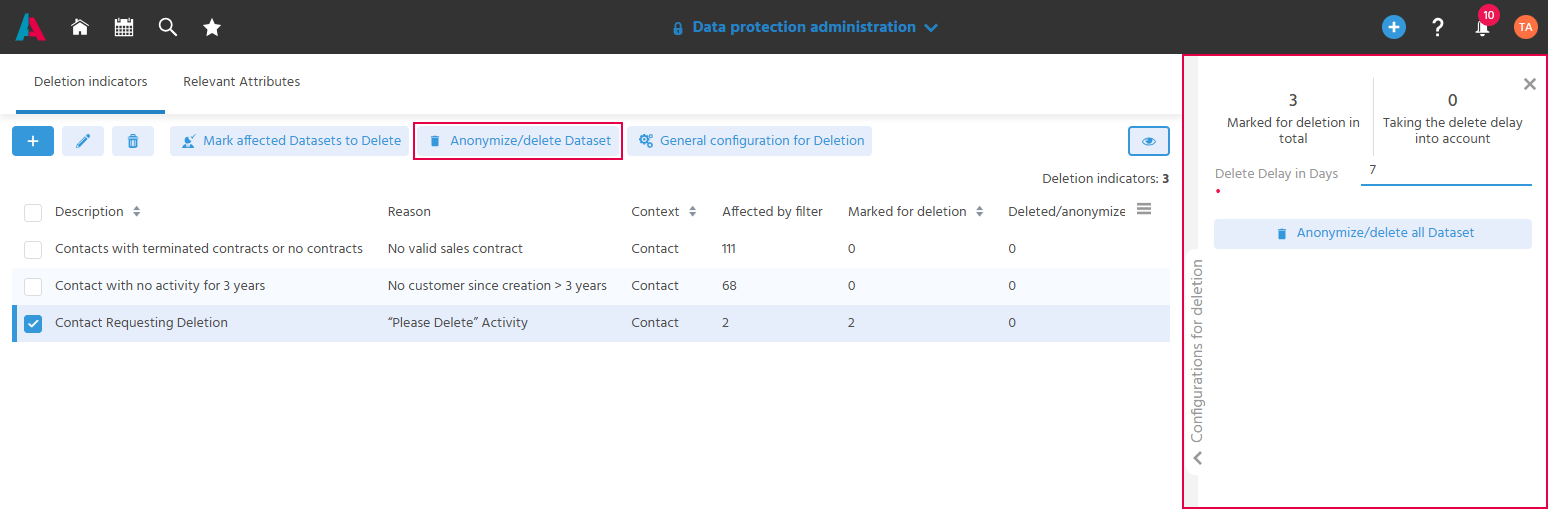
- The Action opens the mask in which the duration of the delete delay can be adjusted for the individual case if required.
- "Marked for deletion in total" shows how many datasets are marked for deletion in total; all deletion indicators, including those set manually, are taken into account.
- "Taking the delete delay into account" shows how many datasets will be deleted, taking into account the specified and possibly adjusted delete delay, as soon as the "Anonymize/delete all Dataset" Action is executed.
FAQ
What happens to an anonymized contact, and which information can still be viewed?
- The contact is assigned to the company "DSGVO-Anonymisierung". This makes it possible to clearly distinguish inactive anonymized contacts from inactive, non-anonymized contacts of a company.
- Duplicates are no longer displayed.
- The deletion indicator with its reason remains recorded so that it can be traced why the dataset was deleted/anonymized.
- The status is set to "inactive".
- Finally, the contact dataset is removed from the index.
⇒ Information such as membership in a campaign or a bulk mail remains in anonymized form, so that it is still evident how many contacts a campaign contains.
Is it possible to get an overview of deleted data?
⇒ Yes, but only via the anonymized data.
BACKGROUND: When contacts are anonymized/deleted, the status of the contact is finally set to "inactive".
To be able to distinguish between inactive anonymized contacts and inactive non-anonymized contacts of a company when filtering, the inactive anonymized contacts are assigned to the company "DSGVO-Anonymisierung".
Persons for whom only an Other Function was deleted/anonymized are also listed as an anonymized contact at the company "DSGVO-Anonymisierung"; the remaining Other Functions are fully retained in the system and no longer have any relationship to the deleted dataset.
As a result, the original company only contains active and inactive, non-anonymized contacts. Inactive anonymized contacts can be clearly filtered via the company "DSGVO-Anonymisierung".
Can deleted data be restored?
⇒ No, deleted data cannot simply be restored, except from a complete data backup. If, for example, a contact has been deleted/anonymized, it must be created again.