Managing Deletion Indicators
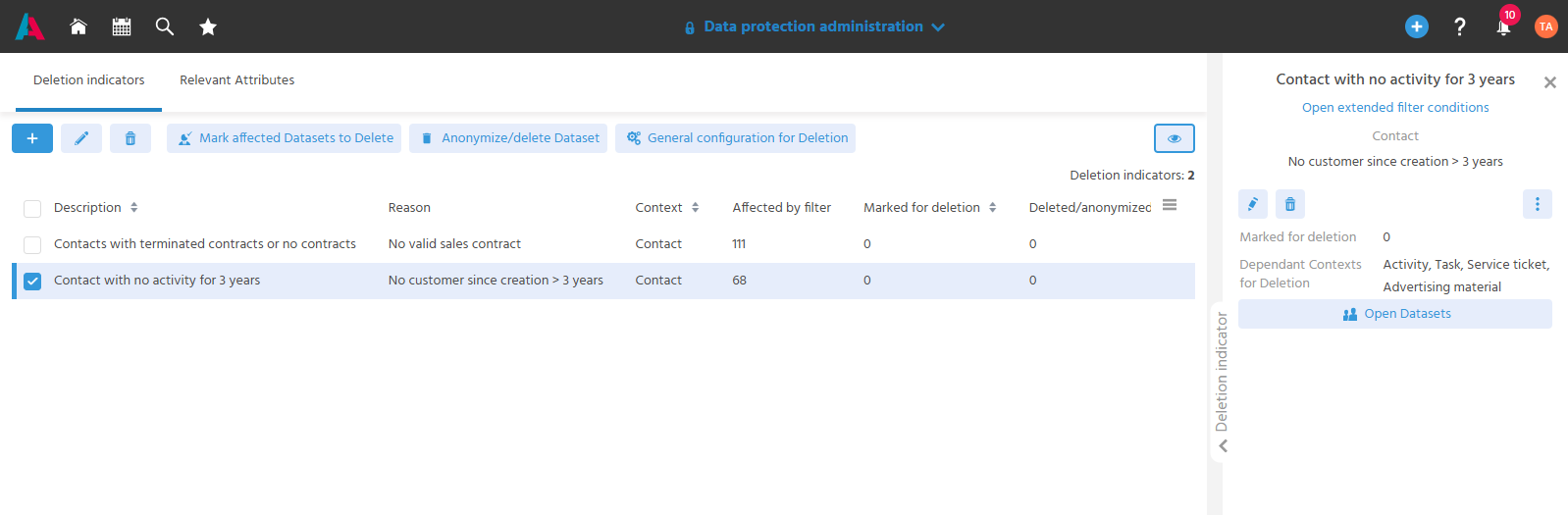
In the "Deletion indicators" tab of the "Data protection administration" Context, Data Privacy Agents define and maintain deletion indicators for various conditions. The system then sets these deletion indicators on the affected contact datasets.
It can be checked in advance which datasets are affected by a deletion indicator and which dependent data is removed along with them during deletion.
⚙️ → Via the role "Data Privacy Agent" (PROJECT_DSGVO), the "Data protection administration" Context is only displayed to authorized users in the Global Menu in the menu group "Administration".
The System Manager assigns the role to the Data Privacy Agent so that only they can manage deletion indicators and GDPR-relevant attributes.
Creating Deletion Indicators
Deletion indicators are created so that datasets can be marked for deletion based on defined conditions.
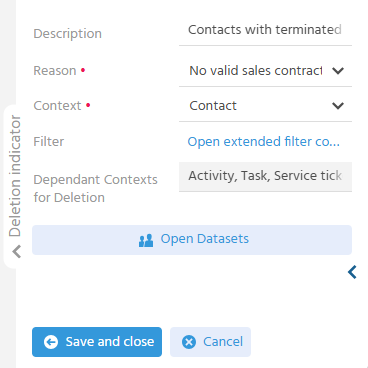
When creating a new deletion indicator, the following fields are captured:
- Description – Information field for the Data Privacy Agent.
- Reason – From a business perspective, this is where the reason why a deletion indicator is to be set is specified, e.g. "Sales contract expired".
- Context – The Context whose datasets are marked for deletion.
- Filter – The conditions used to determine the datasets for which the reason for deletion applies.
- Dependant Contexts for Deletion - The Contexts that are also deleted as soon as the contact is deleted/anonymized.
Entering the Reason
From a business perspective, this is where the reason why a deletion indicator is to be set is specified, e.g. "Sales contract expired".
The reason is either taken from the selection or entered manually. A manual reason, which may only be needed once, is entered and applied with the plus button. The name entered in the "Reason" field may only be used once in the system.
⚙️ → The selection in the "Reason" field can be customized via the keyword category DSGVOREASON if further reasons are needed.
Defining the Filter
The filter represents the reason why the data must be marked for deletion. The reason must therefore be definable via the filter criteria of the "Contact" Context. This allows the filter to determine the datasets for which the reason applies, and the deletion indicator can be set.
The filter criterion "No Activity" determines all contacts for which no activity has been created within a defined period.
The predefined filter "Is an active employee equal No" excludes all employee contact datasets from the automated setting of deletion indicators.
Tracing the Scope of Deleted/Anonymized Data
As soon as the Context is selected, the field "Dependant Contexts for Deletion" shows which Contexts are also deleted during deletion. This makes it possible to trace the scope of the deletion before it actually takes place.
🛠️ → In xRM, the "Contact" Context is delivered with the dependent Contexts "Activity", "Task", "Service ticket" and "Advertising material". The selection of Contexts and their dependent Contexts can be extended via customizing.
📖 → Which data is deleted or anonymized in detail is described under Running the Automatic Deletion/Anonymization Process.
Overview of Datasets Affected by the Filter
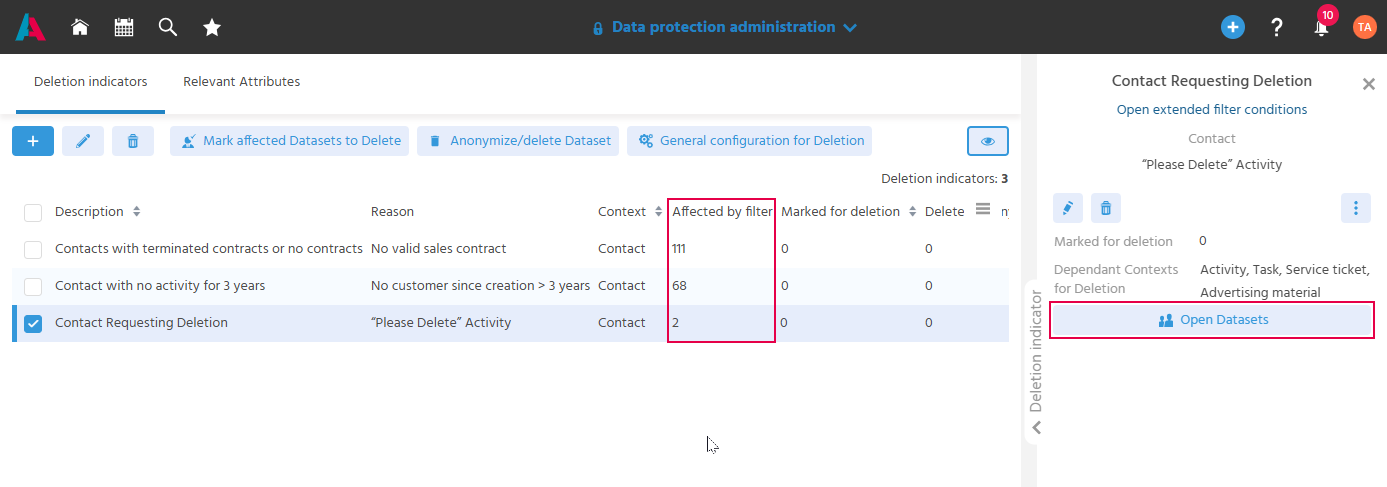
The table of deletion indicators and the preview of a deletion indicator show how many datasets are affected by the filter.
The column "Affected by filter" displays the number of datasets.
The "Open Datasets" Action opens a "Live View" of all datasets that would be listed as a result under the configured filter condition. This makes it possible to check whether the filter is defined correctly before datasets are marked for deletion with it.
Editing Deletion Indicators
A deletion indicator is edited to adjust its filter configuration or its name. A deletion indicator can be edited at any time.
If the reason is edited subsequently (e.g. to correct a typo), the change is also applied to deletion indicators that have already been set on the contact.
Deleting Deletion Indicators
Deleting Deletion Indicators in the Administration
A deletion indicator that is no longer needed is removed in the "Data protection administration" Context with the delete button.
Deleting a deletion indicator removes the marking from all contact datasets on which it was already set.
The "Logs" tab of the contact shows why the status of the contact has changed and which deletion indicators were removed.
Deleting Deletion Indicators on the Contact
In addition, users can delete manually set or system-set deletion indicators on an individual contact dataset. This is the case if there are reasons that speak against deleting the contact.
All deletion indicators must be removed in the "Data Privacy" tab (delete button); the status is then set back to "active". Both manually set and process-set deletion indicators can be removed from the contact with the delete button.
System Manager Data privacy