Release Notes 2026.10.0

Please find below selected features and important information about the new xRM version.
General Changes
🚀 Create and edit business documents in xRM without switching tools
Templates for business documents such as letters, quotes, and invoices can now be created directly in xRM in the customer's individual corporate design by authorized users. When a document is used, it can still be edited directly before the manual or automatic PDF export, without any detour via external programs.
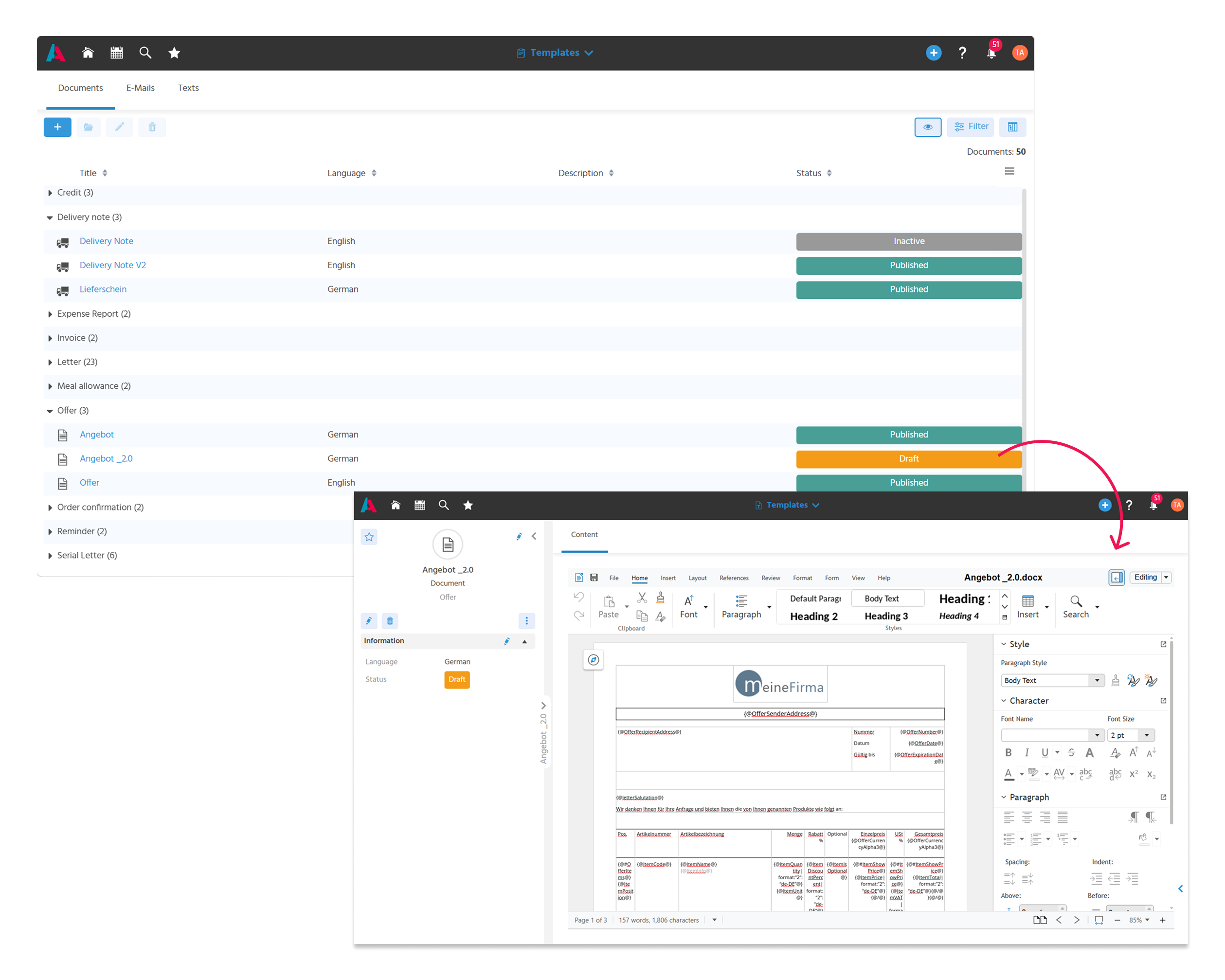
This is made possible by a new, integrated document editor:
- Templates can be created and maintained directly in xRM using familiar formatting options (font, paragraph, styles, tables, etc.).
- The functional administrator determines in which context a template can be used (letter, mail merge, quote, invoice, or credit note).
- The status of a template is marked as "Draft", "Published", or "Inactive". Only published templates are available system-wide.
- Placeholders are set in the template and are replaced by data from xRM.
Previously, creating and adapting a template with complex data, such as in quotes or receipts, was only possible with considerable effort and little flexibility in the ADITO Designer via JasperReports, and required technical know-how. In addition, documents that had already been generated could no longer be edited before sending, so adjustments were either not possible at all or only possible by switching tools.
Notes:
- The previous JasperReports for quote, receipt, reminder, and expense report have already been converted into document templates and replaced. The remaining JasperReports (information request report, information report, master data sheet, and service record) will remain unchanged for the time being and will gradually be converted to document templates as well.
- Customers can switch their business documents from JasperReports to the new document templates step by step. This is controlled via parameters, so, for example, the receipt could already use the document template while the quote continues to be based on JasperReports.
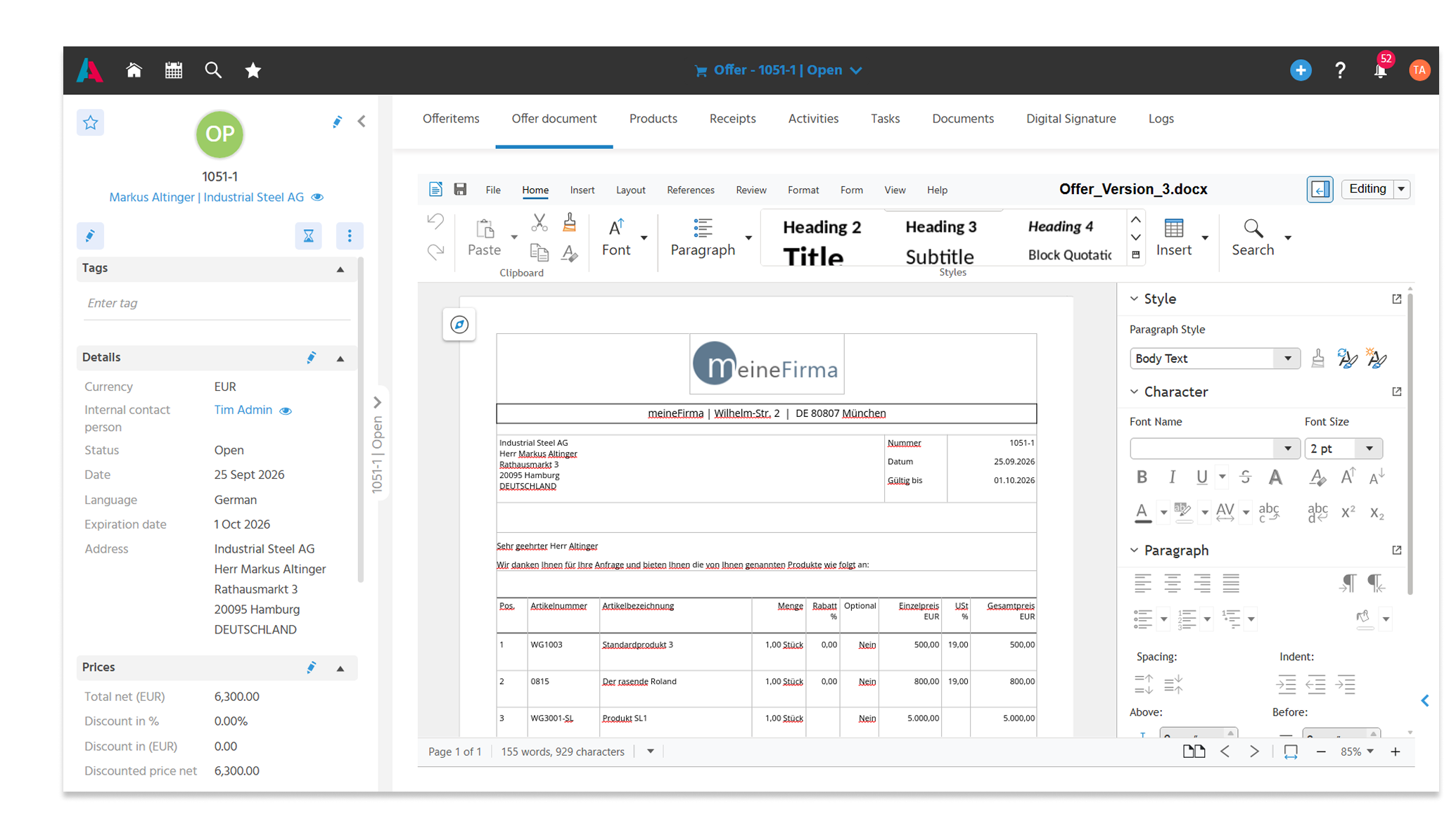
ℹ️ Further information: Document Editor documentation
Field Service
🚀 New "Visit" context: Visit and tour planning for field service
Previously, field service employees had to map their visit and tour planning in the resource scheduling module, which was not ideal for this use case. That is now a thing of the past: with the new Visit context, field service employees get their own tailored tool for complete visit and tour planning, from automatic suggestion generation through preparation to the finished route in Google Maps and follow-up.
No customer is forgotten anymore
Based on a stored visit frequency, new visits are automatically suggested to the user at the appropriate intervals, so they no longer have to manually keep track of which company should be visited again.
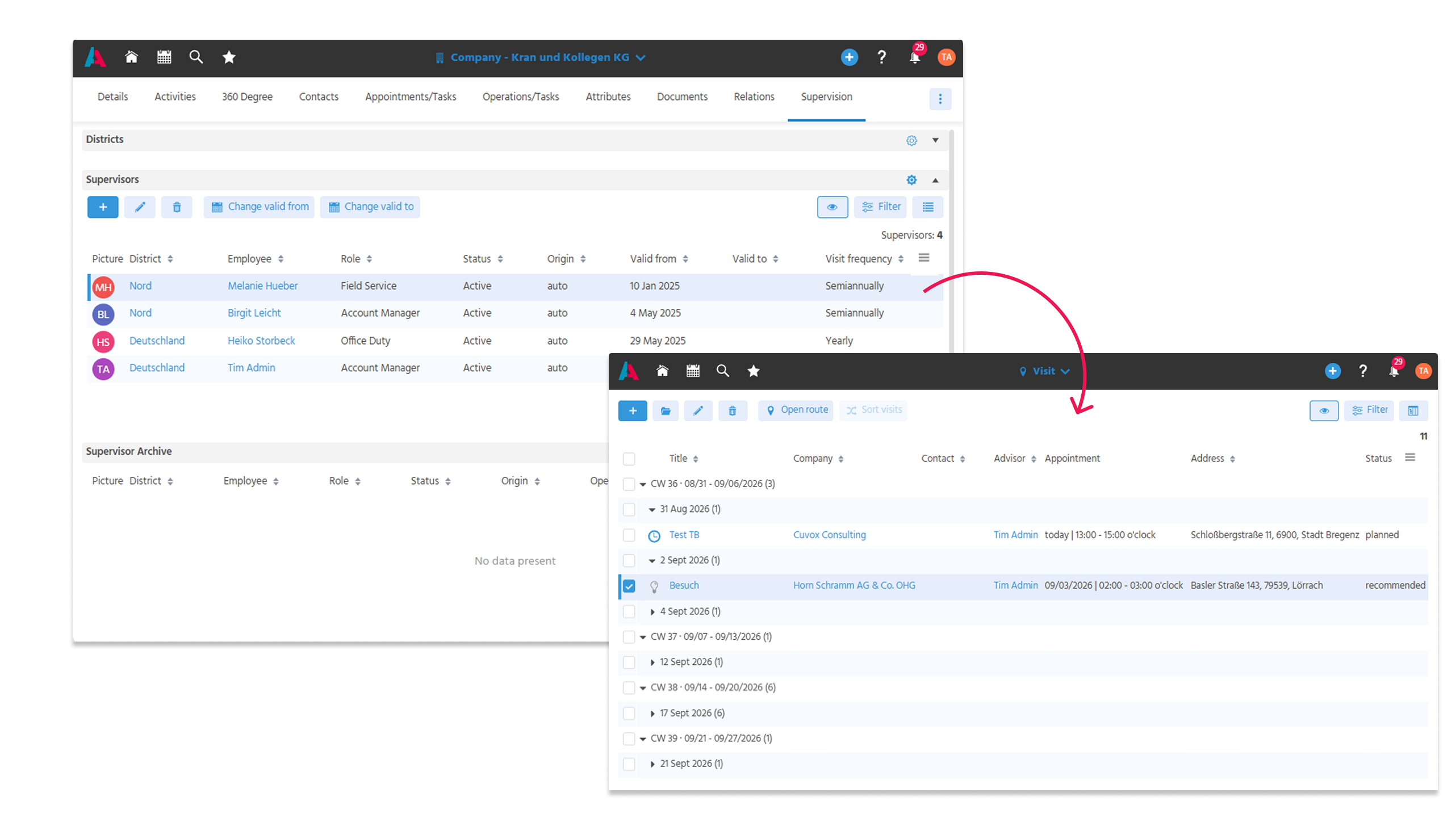
Always the full overview
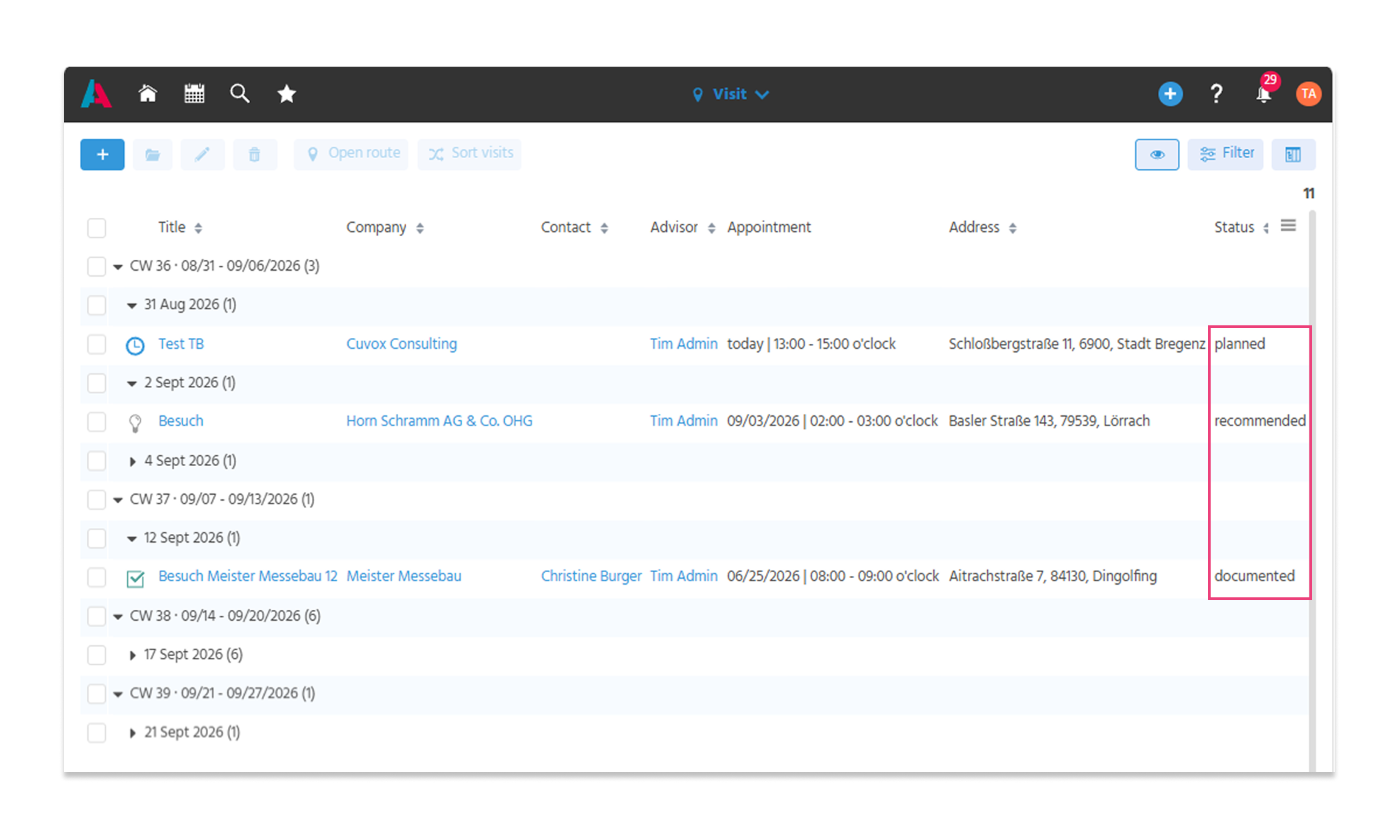
A clear filter view shows suggested, planned, and documented visits of past, current, and upcoming weeks at a glance, including the option to optimize the daily order via drag & drop. Visits are also directly visible in the 360° view of a company and contact, without having to switch contexts.
Create visits flexibly
A visit can be created wherever the user is currently working: directly in the Visit context, from a company or a contact, from an existing appointment, or via radius search to include further nearby companies in the same tour. Appointments and visits can be linked to each other at any time.
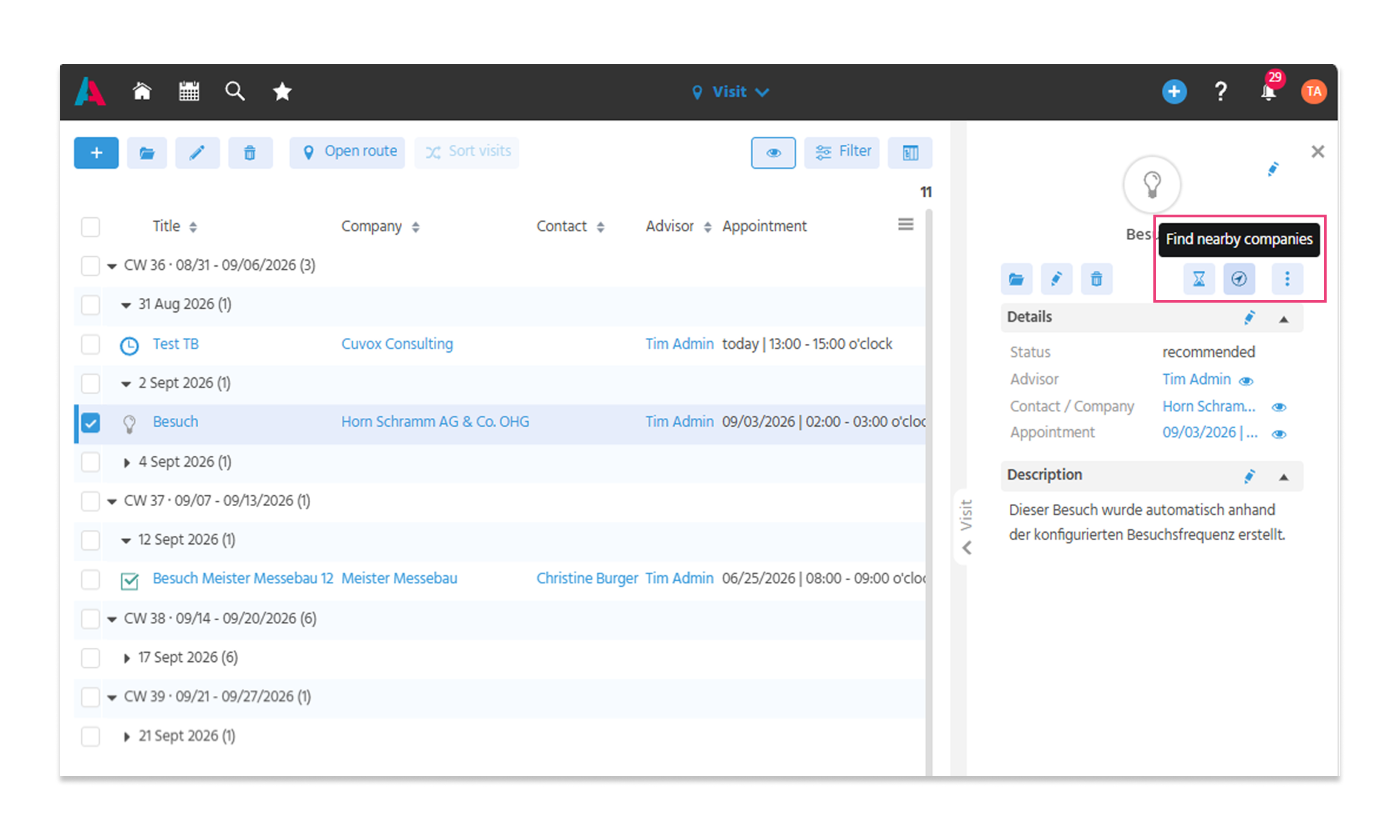
Optimally prepared for the conversation
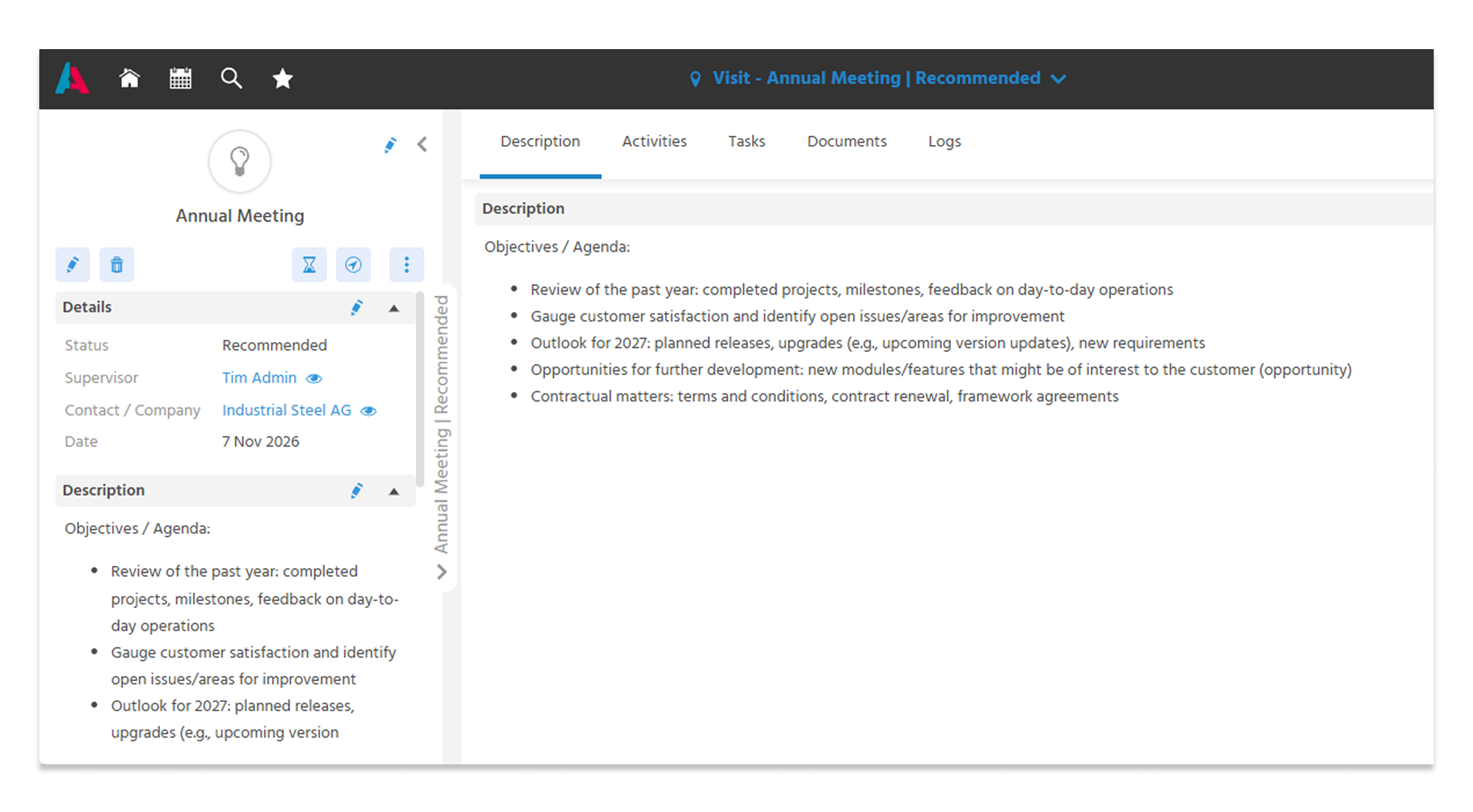
Visits can be enriched in advance with contact, notes, activities, and documents, so that all relevant information is at hand. If a fixed appointment is desired, a linked appointment can be created from the visit, including participants and, if a calendar system is connected, automatic sending of invitations. Not every visit necessarily requires an appointment – visits can also simply be planned for a particular day.
Drive the tour without detours
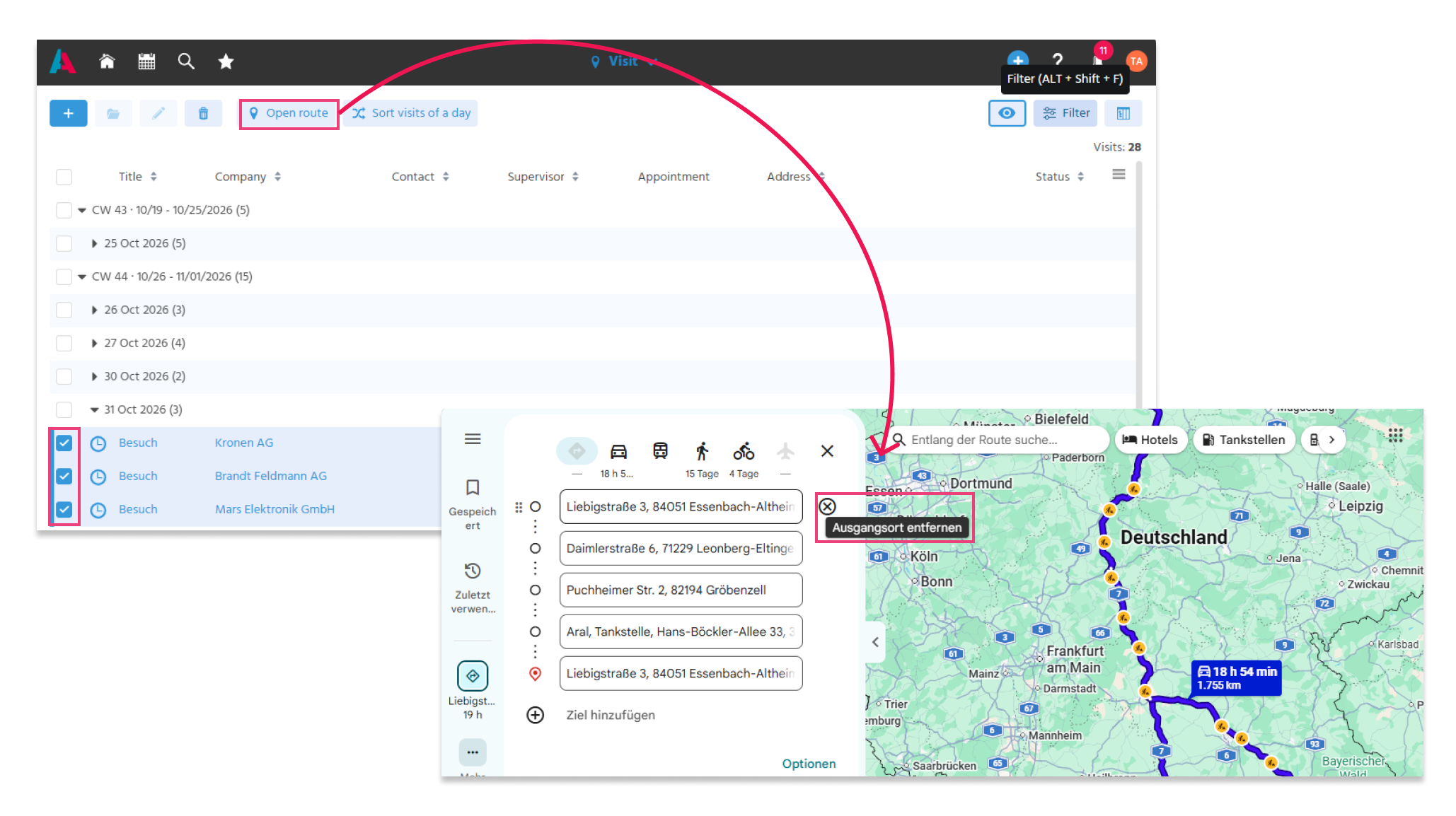
Multiple visits can be opened as a finished route in Google Maps with a single click, eliminating the need to manually fill in a navigation app.
No tedious follow-up
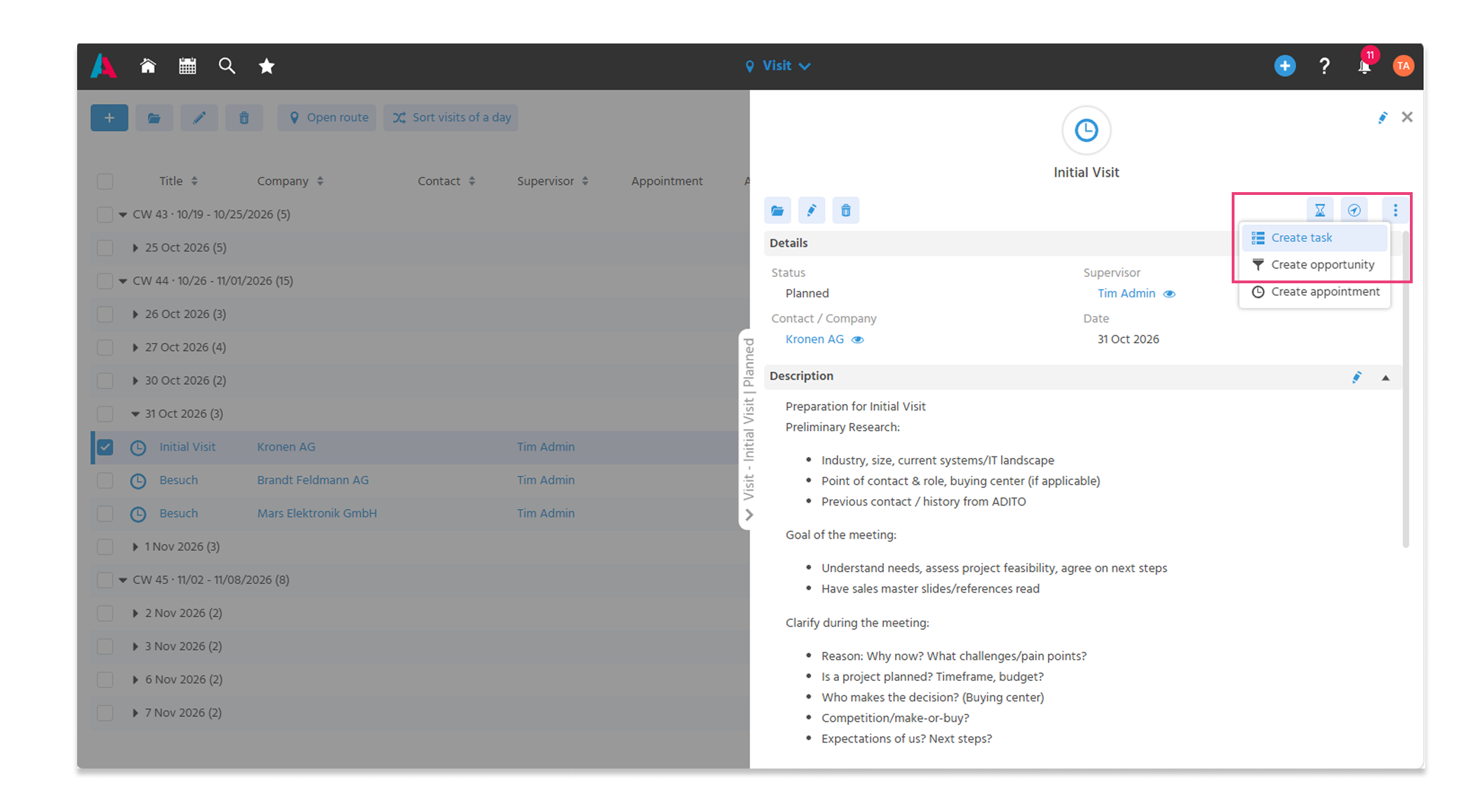
From the visit, the course of the conversation can be documented directly as an activity, or a sales opportunity arising from it can be recorded as an opportunity. Undocumented visits can be filtered specifically so that no open follow-up gets lost.
ℹ️ Further information: You can find a detailed step-by-step guide in the Visit and Tour Planning documentation
🚀 Resource scheduling – Field Service Management (FSM) modules removed
It was found that resource scheduling was only being used for planning visits. Since this can now be fully implemented in the new Visit context, the FSM modules (resource scheduling) have been removed from xRM.
The following contexts were removed as a result:
- Assignment suggestion
- Resource
- Assignment
- Resource planning
- Assignment task
- Assignment task template
The expense report remains included.
🔧 Technical note: The modules remain in xRM/modules as a code base, but are marked as deprecated.
Collaboration
🚀 Extended global search for projects and project tickets
Projects and project tickets can now be found via the global search using additional relevant search terms. This allows the project manager or project member to find the records they are looking for faster and more effectively.
The following fields have been added to the global search:
- Project: Company
- Project ticket: Requester, Assignee
AI
🚀 Capture activities and tasks via AI
Customer communication can now be captured directly as a structured activity or task via AI, without any manual preparation. This saves the Sales Executive time on follow-up work and allows them to focus on what matters.
Using the "Capture via AI" action in Quick Capture, you first choose whether an activity or a task should be created. Then it is enough to paste the report, the phone call, or the task as free text into the content summary. The AI automatically extracts participants, results, and next steps from it and fills in the corresponding fields correctly as a newly created activity or task.
Beyond contact and company, the AI also automatically links other thematically matching records such as opportunity, quote, receipt, or contract, provided they are mentioned in the text and are already connected to the recognized contact or company via the 360-degree view.
After automatic capture, the activity or task has been created. The record then opens for review, so that the user can check the content generated by the AI and correct it afterwards if necessary.
ℹ️ Further information: Documentation: Capture activities or tasks via AI
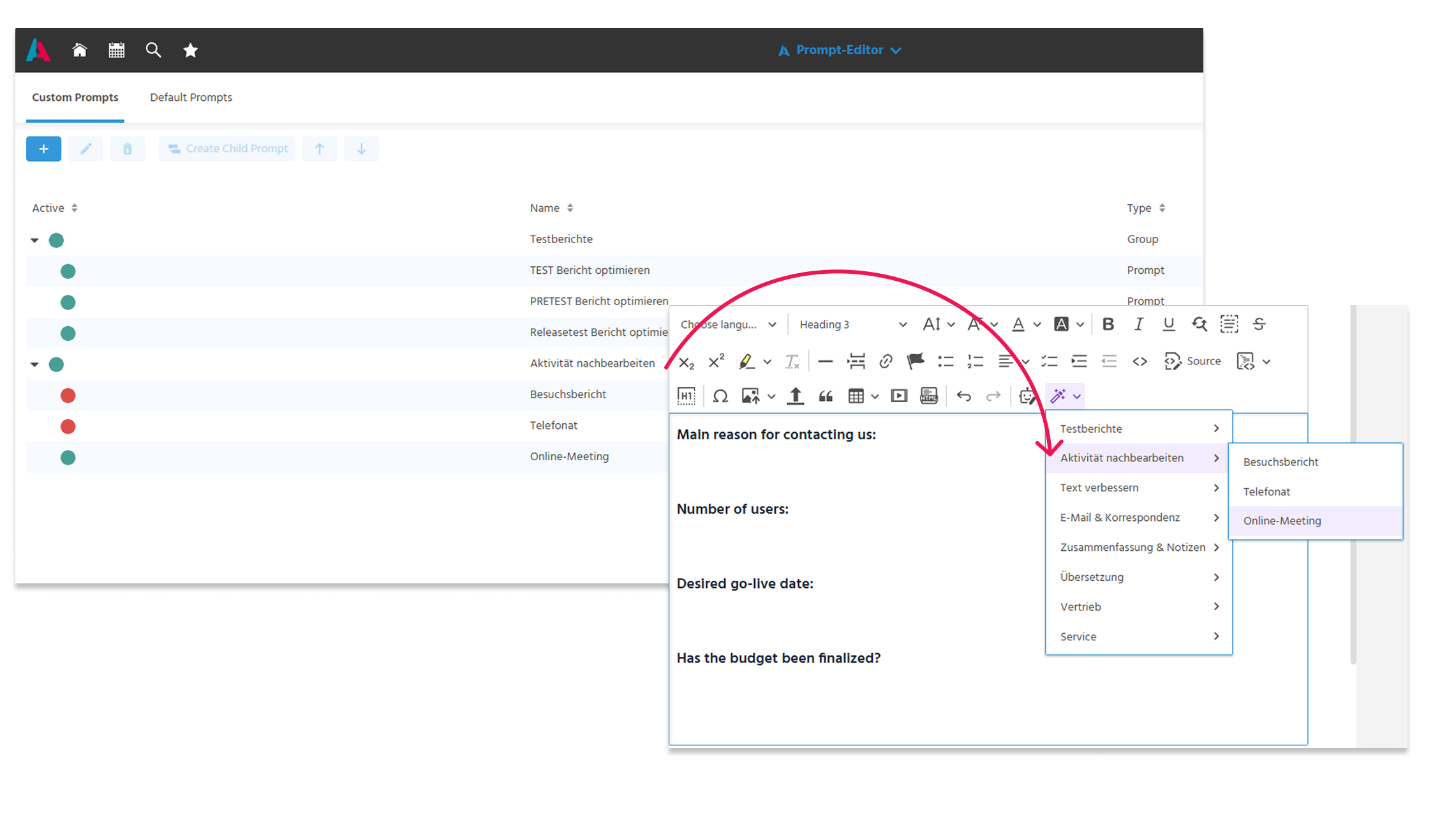
🚀 Configure and manage AI prompts individually
Users can now configure AI prompts for the HTML editor and Mosaico editor directly in the client. Previously, this required a process in the Designer, so adjustments were only possible with technical know-how.
A functional administrator can centrally maintain the default prompts and groups for all users in the administration. In addition, new default prompts are delivered with this release.
Via the user settings, the user reaches the new prompt editor in the "Prompt configuration" area using the "Manage prompts" action.
There are two areas available there:
- Individual prompts: create, edit, structure, or (de)activate your own groups and prompts
- Default prompts: display the prompts stored in the system and activate or deactivate them for yourself
After logging in again, the configured prompts are available in all editors via the "AI commands" 🪄 action for recurring tasks such as revising wording or translations.
ℹ️ Further information: Documentation: Manage individual prompts
🚀 Optimization of AI-supported pre-qualification of service ticket templates
The AI-supported pre-qualification of incoming service tickets can now be used even more flexibly, especially with multiple inboxes that handle the same topics. The Inbox field is no longer mandatory for service ticket templates. If the field is left empty, an incoming ticket keeps its receiving mailbox when the template is selected and used by the AI. This allows the Service Agent or Head of Service to use AI pre-qualification even with multiple inboxes handling the same topics, without tickets unintentionally moving to a different inbox.
Data Protection
🚀 More transparency in data protection administration
When configuring the deletion flag and when manually deleting/anonymizing, the Data Protection Officer now gets a clear overview of how many records are affected. This makes it easier to assess whether a set filter delivers plausible results and what impact a deletion action will have.
Overview in the data protection configuration
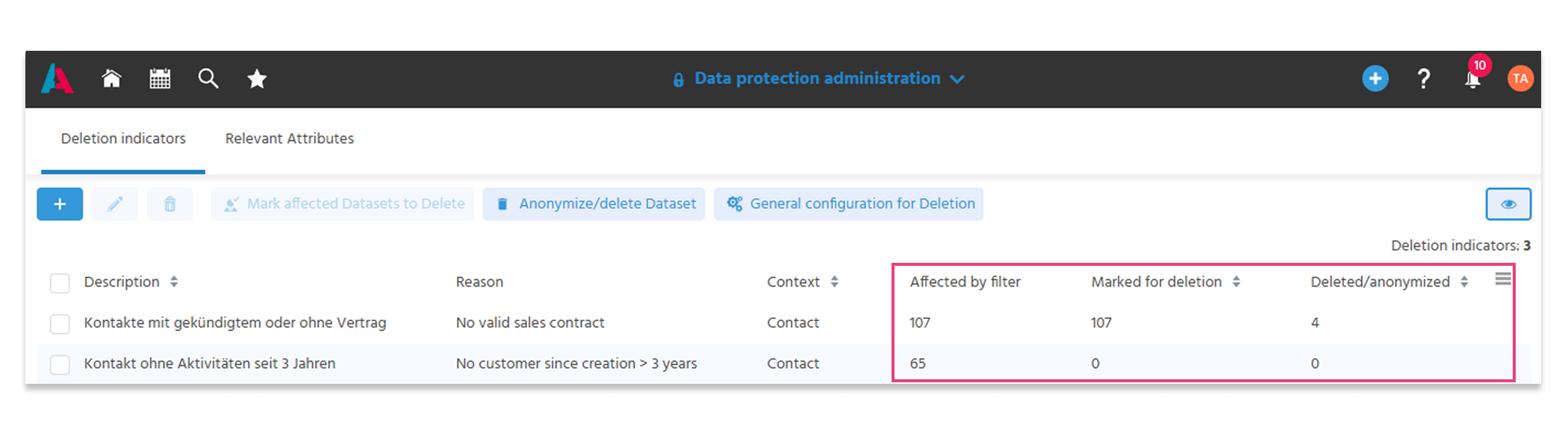
The table of the data protection configuration now provides three meaningful columns for this purpose:
- Affected by filter: Number of records captured by the set filter that have not yet been deleted/anonymized
- Marked for deletion (formerly "Number of affected records"): Number of records for which the deletion flag has already been set but which have not yet been deleted/anonymized
- Deleted/anonymized: Number of records that have already been deleted or anonymized
In addition, the "Open records" action will in future automatically no longer show records that have already been deleted or anonymized, so the user immediately sees only the records that are actually relevant.
Transparency when manually deleting/anonymizing
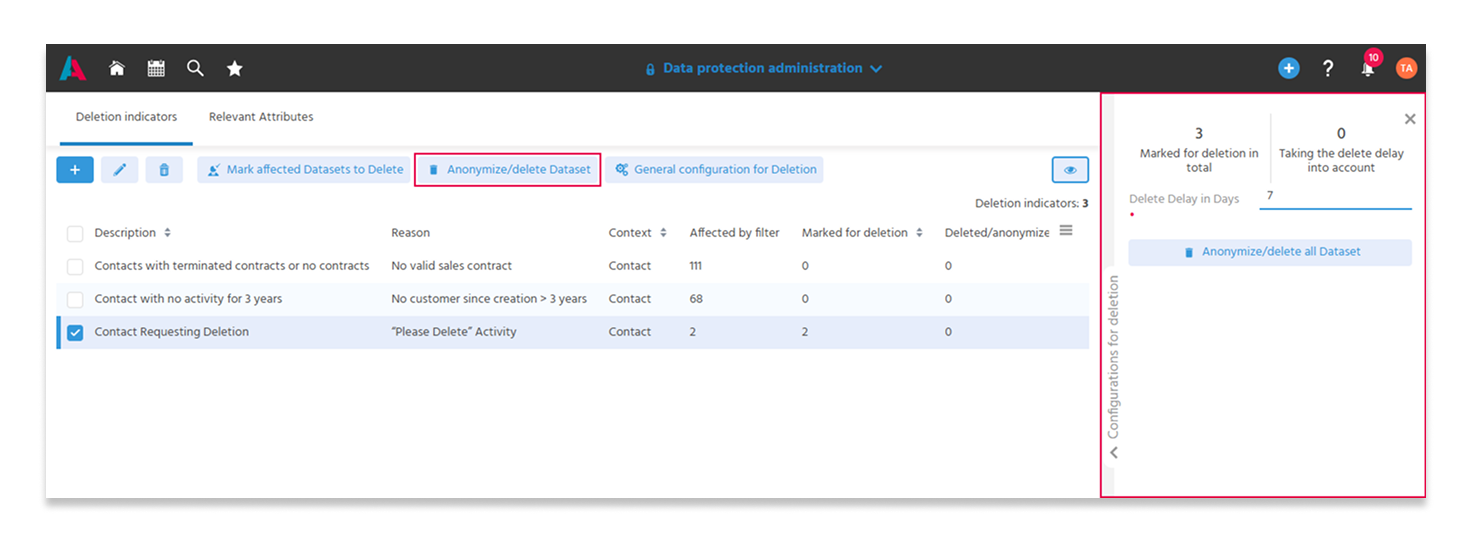
When executing the "Delete/anonymize records" action, the SmallEdit now opens instead of the previous popup message. There, the deletion delay in days can be adjusted individually, while it is immediately displayed how many records in total are marked for deletion and how many of them would actually be affected, taking the selected deletion delay into account. This way, the Data Protection Officer knows exactly what impact their action will have before executing it.
ℹ️ Further information: Documentation: Data protection administration
Minor Adjustments
🚀 Update of country information
The postal code validation has been updated and brought up to date for the following countries: Argentina, Ireland, Cambodia, Netherlands, Peru, South Africa, Taiwan, and Vietnam. New customer systems will in future be populated directly with the correct values.
Northern Ireland and the Canary Islands have been added to the country selection. In addition, Weißrussland has been renamed to Belarus.
Technical Changes
🚀 Digital signature: Future-proof integration with SIGN8 Signing Portal (SIPO)
Quotes are now digitally signed in the Signing Portal (SIPO) from SIGN8. Previously, the signature was requested and obtained via the Signing App; this, including its Workflow API, is being retired: support ends at the end of 2026, and shutdown will occur no later than the third quarter of 2027.
-
Automatic signature areas: For each signer, a signature area is generated in the document to be signed, both in the quote report and in the new document templates. Where it is placed and how large the field becomes is determined by the template or report, no longer by a fixed coordinate
-
Authentication of the signer: The simple signature is delivered by default. The signer confirms it with a six-digit code that SIGN8 sends to their email address. The interface also supports the advanced and the qualified signature. Which type of signature is used can be set individually for each business process in customizing.
-
Email sending exclusively by xRM: The previous duplicate notification by the provider no longer applies.
-
Status feedback: Signatures, rejections, and completion are automatically updated on the signature process and per signer. After completion, the signed documents are stored on the object and the quote is set to "Won"
-
Protection against outdated documents: If a signer is added, changed, or removed after the document was generated, a notice on the quote indicates that the document should be regenerated
Migration: As of module version 4.0.0 (digitalSigning), the previous interface is replaced. A mere version change is not sufficient; the configuration in the Signing Portal of SIGN8 must be set up beforehand.
🔒→ A login for the GitLab xRM group is required for the following link
ℹ️ Further information: Read me – Setting Up the SIGN8 SIPO Integration
🚀 Embed appointments via link field
Appointments can now be referenced via their plain UID and open directly in the regular Appointment context. The display of a linked appointment (e.g., "08.09.2026 | 15:13 – 16:13") is also shown in the familiar format. If a link points to an appointment that has since been deleted or the calendar permission is missing, the entry simply remains empty.
For customizers: With the new entity AppointmentLinker_entity, a jump target is now available that allows appointments to be integrated into projects via linkedContext, consistently with other objects.
🚀 Faster filter views through optimized database queries
Users now benefit from noticeably faster filter views in the contexts Activity, Opportunity, Quote, Receipt, and Contract. The cause was partly slow count queries in the background, which led to delays when loading filter views, especially with complex data structures with many links (joins).
For these contexts, the underlying query logic has now been optimized using the new isCount functionality, so that the number of records is determined much more efficiently.
🚀 Improved code quality through ESLint cleanup
ESLint pipelines are now active for all modules. This means that with every code change, a check is automatically performed in future to see whether new ESLint errors have been introduced. If errors are found, merging is not possible, so code quality is permanently kept at a high level.
🚀 Extended filter options for company lookups
When selecting a company (e.g., in a contact), only the filter fields of the index record container were recently available, which meant that familiar filters such as company type and status were missing, and custom fields additionally had to be laboriously maintained and translated in the index RC. The change was originally intended to improve performance, but the duplicate maintenance outweighed the benefit, which is why it has been rolled back to a DB record container. Users there now benefit again from all regular filter options, including fields added individually via customizing, without any redundant maintenance in the index record container.
The previous behavior for duplicates is unaffected. In addition, new filters for default email and default phone are available for Organization.
For the customizer this means: Fields that were previously created redundantly in the index RC to make them filterable are no longer necessary in future and can be cleaned up.
🚀 Automatic processing of large data backlogs in batches
If a larger backlog builds up when processing observations (observation_bg), for example after an outage of the ObservationBG_serverProcess, the customizer no longer has to manually split the entries into subsets and have them processed one after another: the process now handles batch processing on its own.
If the processing of a batch fails, batches that have already been processed successfully are still removed from observation_bg – only the affected part needs to be run again, not the entire backlog.
Hypercare contact synchronization:
🚀 Reliable synchronization of large contact filters under MariaDB
The Sales Executive can now rely on complete and reliable synchronization of their filters even with a large number of found contacts. This is made possible by a more compact query that is significantly more efficient for the database parser to process.
Previously, the SQL statement generated during synchronization could become so large with big data volumes that MariaDB could no longer process it, and the synchronization then failed.
For customizers: The preferences required for the contact sync are now delivered directly, including description and default value, and no longer have to be created manually. The contact sync is disabled by default to avoid accidentally syncing test data into productive Exchange environments. In addition, the new service graphSyncUserIdList_service can optionally be used to restrict the sync to individual users, which makes targeted debugging much easier.
🚀 LDAP module: Project-specific extensibility without a customizing fork
The LDAP module can now be adapted project-specifically without having to copy and modify the delivered process. This saves the customizer effort during integration and updates – and at the same time reduces version fragmentation of the customizing.
The following areas can now be adjusted via your own project-specific extensions (services) instead of modifying activeDirectoryImport_serverProcess directly:
- Role assignment
- Field mapping (LDAP attributes)
- Communication types
- List of users to ignore
- Additional search criteria for existing ADITO users
This noticeably reduces merge effort and version drift for future module updates.
In addition, the CONTACTID of the company itself is no longer stored in the code as a placeholder value, but is read from the already established project preference myCompany.contactID. If the setting is missing or points to a non-existent contact, the import aborts with a clear error message instead of creating contacts with an empty organization/address assignment.
Prerequisite for operation: Projects that newly integrate or update the module must have the preference myCompany.contactID set.
🚀 New documentation for Dependency_lib
When implementing customizing with the Dependency_lib or the entityDependencyMapping_service, problems regularly occurred up to now due to insufficient documentation. Since dependencies are a frequently recurring topic in customizing, detailed documentation is now available to the customizer.
Among other things, it covers:
- the basic function and areas of application of dependencies (lib and service)
- a breakdown of the available "options"
- the available functions (e.g., "getUIDsfn", "getForeignKeys", "getForeignObjectTypeAndKeys") including an explanation of when which function is appropriate
- several detailed usage examples
This allows customizing to be implemented more smoothly, and the support effort through queries from partners and internally is noticeably reduced.
🔒→ A login for the GitLab xRM group is required for the following link
ℹ️ Further information: documentation for Dependency_lib